
Participant
April 17, 2024
Answered

Signing with certificate without date / timestamp

  • April 17, 2024
  • 1 reply
  • 3243 views

Hi all,

I need to sign a document with a certified signature, but without the date (timestamp) appearing next to the signature. This is because my administration won't accept the document if it has a timestamp.

I can't find a way to do it, anyone can help?
This topic has been closed for replies.
Correct answer try67

You can do it by creating a new Appearance for your signature profile that doesn't contain the date.

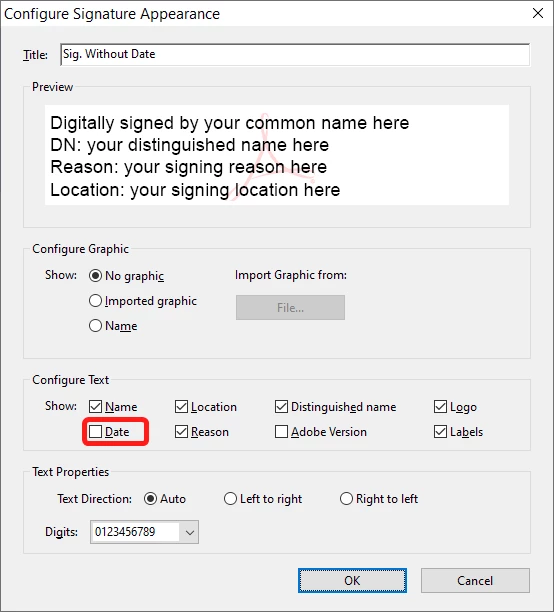
Click the signature field, select your profile and then select Create New Appearance under the Appearance drop-down. In the dialog window that opens un-tick the "Date" check-box under "Configure Text", give it a name (such as "Sig. Without Date") and then save it and use it for signing the file:


Of course, your signature will still contain the timestamp of when it was applied, but it won't be visible on the page.


1 reply

try67
Community Expert
try67Community ExpertCorrect answer
Community Expert
April 17, 2024

You can do it by creating a new Appearance for your signature profile that doesn't contain the date.

Click the signature field, select your profile and then select Create New Appearance under the Appearance drop-down. In the dialog window that opens un-tick the "Date" check-box under "Configure Text", give it a name (such as "Sig. Without Date") and then save it and use it for signing the file:


Of course, your signature will still contain the timestamp of when it was applied, but it won't be visible on the page.


Participant
April 19, 2024

Thanks, I'm on mac, so it's slightly different, but I found it now (there's "Create" in the top right corner of the window that appears when you sign; weirdly, that's where you can remove the timestamp)