
simple calculation using 14 decimals instead of 2
I've tried formating, adding in various suggest code/script but nothing is working, I've read previous posts about how the code/script worked for them but it is not working for me.
The numbers are displaying with 2 decimals but when you click on the field is shows the 14 decimal places. This throws up the simple view (of 2 decimals) when calculating.
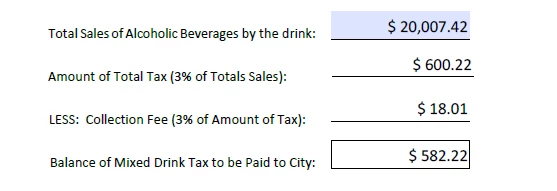
In the example below, a user will enter the 'total sales' (field 1: $20,007.42 ), the 'total tax' is 3% of 'total sales' (field 2: $600.22 displayed/formatted for 2 decimals but when you click on the field you see it is actual the real number is: $600.2225999999999), the 'collection fee' is 3% of the 'total tax' (field 3: $18.01 displayed but real number is: $18.006677999999997), and the 'balance' is 'total tax' minus 'collection fee' (field 4: $582.22 displayed/formatted for 2 decimals, real number is: $582.215922).
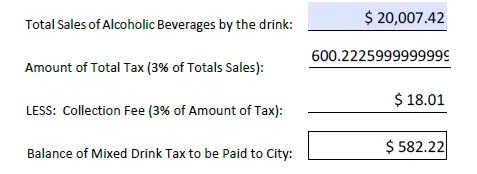
When you look at it with 2 decimals (currency), the 'balance' does not add up (600.22 - 18.01 should equal 582.21 not 582.22). I understand why it is happening, I just dont know how to fix the decimal precision in the calculation to ONLY use 2 decimals.
Here is the script i have for the 'Balance' (field 4):
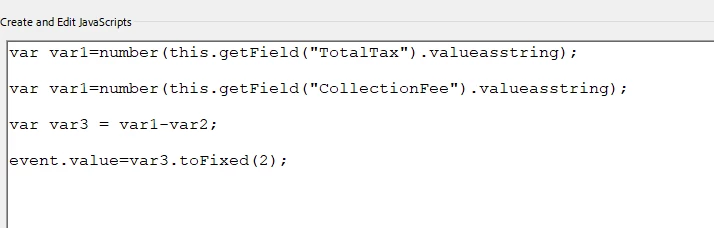
The other calculated fields are following the same template. I've tried several other functions (calculate strings, math.floor, round, toFixed), all not providing the outcome I want.
Can anyone help? I've already reached out to Adobe support and they told me to put in a request on their 'wish list'. I'm a programmer at my core so this doesnt make any sense and when it comes to money and what is displayed, how do you explain the real number calculation to the public who sees the 'balance' (field4) being off by one cent.
Thanks in advance.
 AdChoices