



obscurecat27
Participant
February 18, 2026
Question

Space characters (unicode?) appear after making a PDF accessible

  • February 18, 2026
  • 1 reply
  • 24 views

Back in August of 2024, Patrick39031314z52u asked this very same question with a poor response from an Adobe community manager. Here is Patrick’s text, which matches my issue exactly:

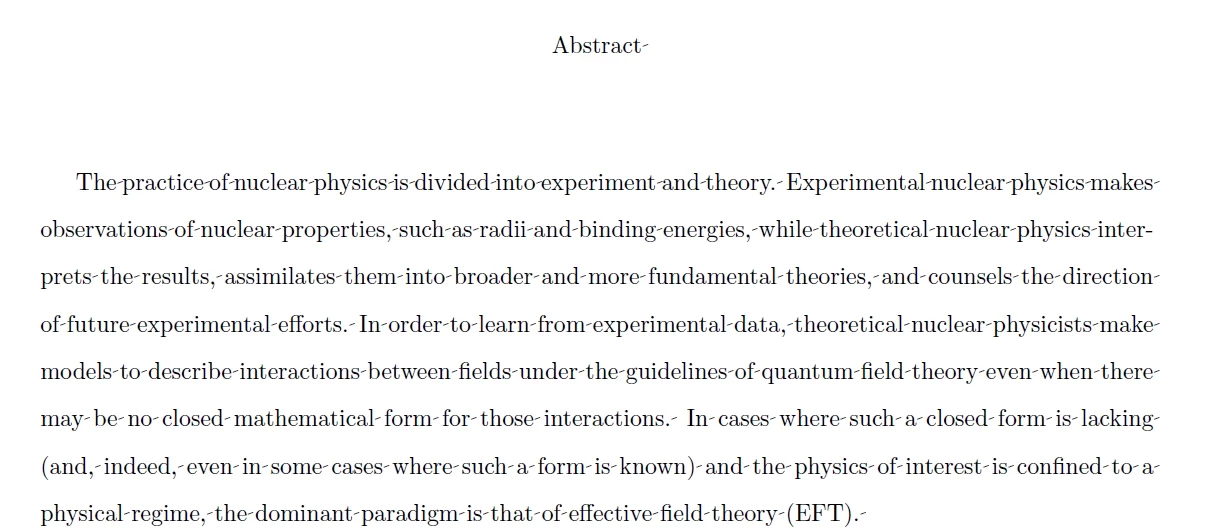
“I wrote my thesis on Overleaf using LaTeX and then downloaded the final document as a PDF. In order to submit it, I need to add certain accessibility features to the document using Acrobat, including language, title, and alt text for the figures. The first two of these went fine, but when I clicked Prepare for accessibility > Add alternate text, Adobe told me that there were no figures in the document. Then, when I clicked Autotag Document and let it tag everything in the document including figures and paragraphs, it found the figures but added a bunch of unwanted dashes between words, which I take to be space characters that have for some reason been unhidden (see attachment).


How can I

1. Eliminate all of the space characters/dashes from the document

[second question deleted because it doesn’t match my needs with the first question]”


I am also attaching the picture Patrick attached, which shows exactly what pops up on LaTeX → PDF converted documents when you turn on the accessibility editor. There are dashes that appear that stand in for spaces, which is really problematic when dissertations and theses go out for publication. 


    1 reply

    Amal.
    Community Manager
    Community Manager
    February 19, 2026

    Hi there 


    Hope you are doing well and thanks for reaching out and sharing your obervation.
     

    As you created the PDF using Overleaf (LaTeX) and now editing it in Adobe Acrobat, it is likely related to how the original PDF was exported and structured.


    We need more information for a better understanding:

    • When you open the PDF in Acrobat and try to select text, does it behave normally (you can select full words and sentences)?
    • If you open the Tags panel (View > Show/Hide > Navigation Panes > Tags), do you see proper structure like <P>, <Figure>, etc., before running Autotag?
    • What is the version of the Acrobat application and the OS you are using? Go to Help > About Acrobat and make sure its upated to the latest version 25.01.21208 , Go to Help > Check for updates and reboot the computer once.

    PDFs created using LaTeX usually do not have accessibility tags added automatically. They may also store text in a strange way, such as breaking words into single letters and saving spaces in a format that Acrobat cannot easily understand.

    When you click Autotag Document, Acrobat tries to recreate the document’s structure on its own. During this process, it can identify things like images and figures, but it may also add odd dashes or extra spaces between words. These dashes are not actually typed in the document — they appear because of the way the text was originally saved inside the PDF.


    Instead of fixing inside Acrobat, the easiest way is to fix the document at the source application (LaTeX) 


    If you are fixing the document in Acrobat, please try the steps below:

    This avoids full auto-tagging and prevents strange character issues.


    Let us know how it goes.


    ~Amal