


Participant
October 23, 2025
Answered

Split Function is locking in Two Pages, Not Single Pages

  • October 23, 2025
  • 1 reply
  • 196 views

Greetings all, 
I have a PDF of 10 pages that I'm trying to split into single pages. 
I go to the Split function, tell it what folder I want it to split to, and ensure that the page number is set to one. 
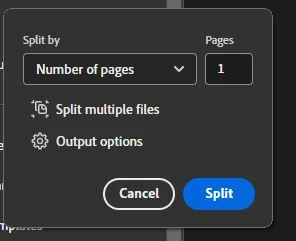

However, when the function runs, I get the following message. 
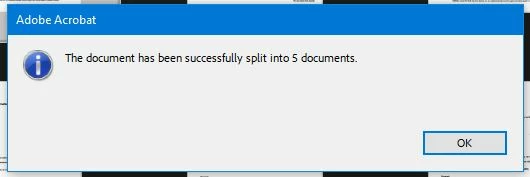


I want it to be split into 10 documents, not 5. 

If I try to split the two page document, I get an alert saying that the File already has 2 pages or fewer. 

Thank you very much for any help you can give me. 

Correct answer try67

This seems to be a bug in the current version of Acrobat. Until Adobe fixes it, you can use the following code to achieve what you described:


for (var p=0; p<this.numPages; p++) {
	this.extractPages(p, p, this.path.replace(/\.pdf$/i, "_P"+(p+1)+".pdf"));
}

You can use it from a Custom Command, for example, or the JS Console.

1 reply

try67
Community Expert
try67Community ExpertCorrect answer
Community Expert
October 23, 2025

This seems to be a bug in the current version of Acrobat. Until Adobe fixes it, you can use the following code to achieve what you described:


for (var p=0; p<this.numPages; p++) {
	this.extractPages(p, p, this.path.replace(/\.pdf$/i, "_P"+(p+1)+".pdf"));
}

You can use it from a Custom Command, for example, or the JS Console.

Participant
October 24, 2025

Thank you so much for responding to my inquiry. I'm not entirely certain how to insert the code into Adobe. I'm sorry to ask, but can you guide me through that? Will I need to insert the code each time I need to splice a document, or will it save the code? 
Thank you again for any time you can spare.

try67
Community Expert
Community Expert
October 24, 2025

It's possible to attach this command to a menu item that will allow you to run it with a single click, but that will require a more complex script and some set-up.

Alternatively, you can go to Tools - Action Wizard (not Custom Command, as I wrote before) and create a new Action that executes this code (make sure to untick the box that says "Prompt User" when you add the code to the Action). Then you will be able to run it on your file(s) by executing this Action on them.