
Participant
July 18, 2023
Question

Spooling multiple files into one from other programs

  • July 18, 2023
  • 1 reply
  • 340 views

Hello, I am trying to print multiple files from an estimation/engineering program into one file and Adobe doesn't spool them. The file name prompt with folder location comes up, I type the name I want and then this happens: 
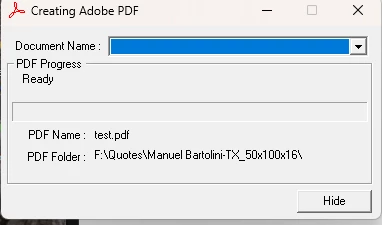
 

Nothing happens after that. A file is not saved. Also the 2 or more selected/tagged files to combine while printing to pdf don't spool and print to pdf.  


I used to be able to select Adobe PDF after tagging a handful of files and then I get the file name prompt, name it and it spooled and printed all the selected files into the one PDF.  


Any suggestions would help me. It's super frustrating because in order to combine all these I have to first print them with Microsoft Print to PDF and have to save each individual file as it spools. I then have to select all those files and go through the combining process with Adobe. It's very inefficient and annoys me. 


Please help if you can. Thank you!  

This topic has been closed for replies.

1 reply

AkanchhaS8194121
Legend
July 30, 2023

Hi @mdflores1828 

We apologize for the delay in response.


If you continue to experience the same issue, then we'd suggest following these troubleshooting steps:

1-  You are printing the files to Adobe PDF, is the Acrobat plugin in the third-party application working fine? Like creating files from Word or Excel using Acrobat Pro extension?

2- Update your desktop application Acrobat Pro to the latest version: 

Go to Acrobat> Help > Check for updates and reboot the computer once (you must save all the work before restarting)

To download the patch manually, more information about this release is here: Release Notes | Adobe Acrobat, Reader

3- If it's already up-to-date, then. Open Acrobat>help>repair installation.

4- If the issue still does not get resolved, then 

Run this cleaner tool to remove the existing installer and application’s file traces:

https://www.adobe.com/devnet-docs/acrobatetk/tools/Labs/cleaner.html

Download the Acrobat installer from here:

https://helpx.adobe.com/acrobat/kb/acrobat-dc-downloads.html


Thanks,

Akanchha