


Participant
May 28, 2024
Answered

Stamps in Customized Toolbar

  • May 28, 2024
  • 2 replies
  • 769 views

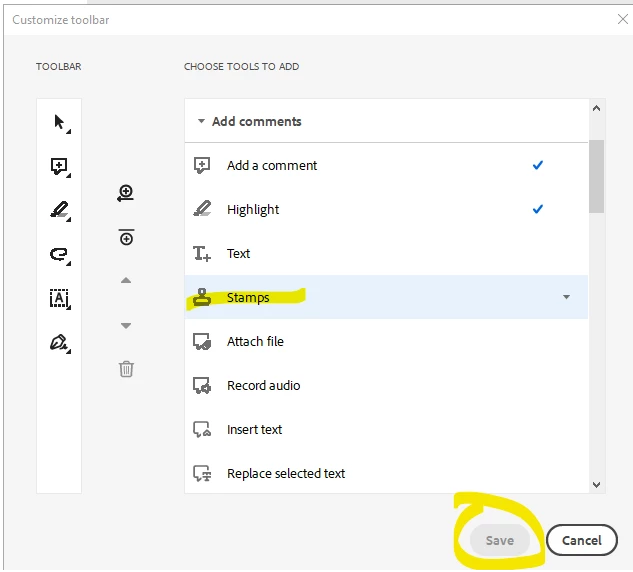
The Stamps option isn't available when trying to customize toolbar.  I have Adobe Acrobat Pro and Standard but neither appear to have this option.   Save is greyed out.  Can someone assist on how to fix or explain why this can't be done.


Correct answer JR Boulay

Try to revert to the Classic UI: https://community.adobe.com/t5/acrobat-discussions/acrobat-2023-how-to-revert-to-classic-gui-user-interface/td-p/14052807
Consider the "new Acrobat" as a beta version, many features are still missing or half-implemented.

2 replies

Participant
August 5, 2024

I'm having the same trouble with adding any custom tool.  In addition, I can't create custom stamps from anything other than a .pdf - may be related.  I'm using Adobe Acrobat Pro 2024.002.20965

PS - would also like to delete some of the default tools, but in my previous version this wasn't possible.

JR Boulay
Community Expert
JR BoulayCommunity ExpertCorrect answer
Community Expert
May 28, 2024

Try to revert to the Classic UI: https://community.adobe.com/t5/acrobat-discussions/acrobat-2023-how-to-revert-to-classic-gui-user-interface/td-p/14052807
Consider the "new Acrobat" as a beta version, many features are still missing or half-implemented.

Acrobate du PDF, InDesigner et Photoshopographe
Participant
March 14, 2025

When I revert to the older version I have the same issue. It will not allow me to add stamps to the toolbar
