


FrequentPDFer
Participating Frequently
June 25, 2026
Question

Starting Acrobat DC in Windows 11 creates new processes but does not start

  • June 25, 2026
  • 5 replies
  • 169 views

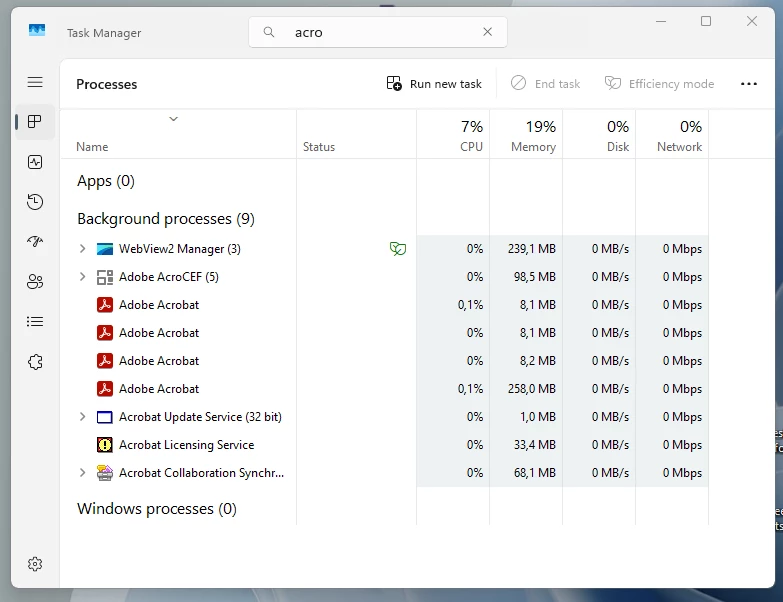
Since the last two updates, Acrobat DC (now: 2026.001.21662) does oftentimes not start anymore. When that happens, I have 2 or more “Adobe Acrobat” processes running plus all the other stuff (collaboration, AcroCEF, Licensing...). Acrobat will only start if I close all the ”Adobe Acrobat” processes manually. If I recall correctly, this happens since installation of the latest two updates.


    5 replies

    el9260056
    Participant
    July 20, 2026

    I am having the same issue, on 2 different machines with 2 different accounts.  Acrobat opens OK the first few times, Once I close the pdf files and try to open another PDF (From windows - double click), Acrobat does not open, however in the Task manager there are multiple instances.

    Here is the current fix, but frustrating.

    https://helpx.adobe.com/au/acrobat/desktop/troubleshoot/performance-issues/acrobat-run-error.html


    Meenakshi0101
    Community Manager
    Community Manager
    July 20, 2026

    Hi el9260056,


    Thank you for reaching out, and sorry for the trouble caused.


    The team has found the root cause and is working on the fix. It will be available in the upcoming update. Once the fix is available, we will update you.

    We appreciate your patience.


    Thanks,

    Meenakshi


    FrequentPDFer
    Participating Frequently
    July 4, 2026

    This does not work since the troubles occur only when starting Acrobat by opening a PDF. If the diagnostic tool could be made to keep running after (not properly?) closing Acrobat to catch the moment when Acrobat is opened anew, it should contain the required info. All this must be related to what happens when starting/closing Acrobat.

    Meenakshi0101
    Community Manager
    Community Manager
    July 6, 2026

    Hi FrequentPDFer,


    Thank you for your patience so far.


    This issue has already been worked upon, and the fix will be available soon.

    We will keep you updated once the patch is available.


    Thanks,

    Meenakshi

    FrequentPDFer
    Participating Frequently
    June 29, 2026

    Sorry but I don’t have the time “to make videos”. Does Acrobat record logs if it does not start?

    Amal Jaiswal
    Community Manager
    Community Manager
    June 29, 2026

    Hi ​@FrequentPDFer 


    Please collect the Acrobat diagnostic logs as described here https://helpx.adobe.com/acrobat/kb/acrobat-diagnostics.html and share them via any cloud stoarge. Just upload the logs, create a link and share that link with us, so we can get this reviewed by the development team.

    ~Amal

    FrequentPDFer
    Participating Frequently
    June 29, 2026

    Hi,

    I updated Acrobat and also repaired Acrobat via the installer. No change.

    As a background, I’m using Acrobat for many years and up to 16 h/day and 7 days a week. If something has changed, I will likely notice it. My typical workflow is as follows:

    Opening a .pdf document from a Win folder > removing pages / redacting content / using Photoshop to align pages and/or remove borders etc. > saving the file > closing Acrobat.

    Opening/closing Acrobat has traditionally been extremely fast (e.g. in contrast to Photoshop), so when there is a delay or nothing happens after clicking a .pdf file in Windows, something is wrong.

    The issues started happening during the past 2 or 3 Acrobat updates (not the latest update) and/or the latest Windows update.

    Amal Jaiswal
    Community Manager
    Community Manager
    June 29, 2026

    Hi there 


    Thanks for sharing the details. Please share a small video recording of the steps you are taking and the issue as it occurs for more calarity. Also collect the Acrobat diagnostic logs as described here https://helpx.adobe.com/acrobat/kb/acrobat-diagnostics.html and share them via any cloud stoarge. Just upload the logs, create a link and share that link with us, so we can get this reviewed by the development team.

    ~Amal

    Amal Jaiswal
    Community Manager
    Community Manager
    June 25, 2026

    Hi there 


    Hope you are doing well, and thanks for reaching out. We are sorry for the trouble you are experiencing.


    What you're describing is a classic ghost process/process lock issue: Acrobat's previous session didn't fully clean up on exit, so when you launch again, the new instance finds those stale processes already occupying the space and just silently hangs rather than opening a window.


    We need some more information for better clarity:

    Does this happen every time you launch the application or only sometimes?

    Are you on a managed/enterprise deployment or a personal machine?


    As described, you have started noticing this since the last two updates, Acrobat DC (now: 2026.001.21662) on Win 11. Please update the application to the latest version 26.001.21677. Planned update, Jun 17, 2026. Go to Help > Check for updates and reboot the computer once. You may also try to download the patch manually https://adobe.ly/4xPEty9 and see if that helps.

    Also, try to repair the installation from the help menu and reboot the application once.  


    Additionally, you may also try to disable fast startup in Windows 11, which can cause processes from a previous session to persist across reboots without a full closure. Go to Control Panel > Power Options > Choose what the power buttons do, click Change settings that are currently unavailable, and uncheck Turn on fast startup. Do a full shutdown and restart, then try launching Acrobat.


    Let us know how it goes.


    ~Amal