October 3, 2019
Answered

Stop Adobe from adding page numbers.

  • October 3, 2019
  • 1 reply
  • 2063 views

I am printing a text file as a PDF.


I have Adobe Acobat 11.0.23 provided by my work.


When I print to PDF, Acrobat is ADDING page numbers.


I need to stop that.


I need a PDF verion of this document, without anything being changed.


I must open the document in Notepad, then print it to PDF.


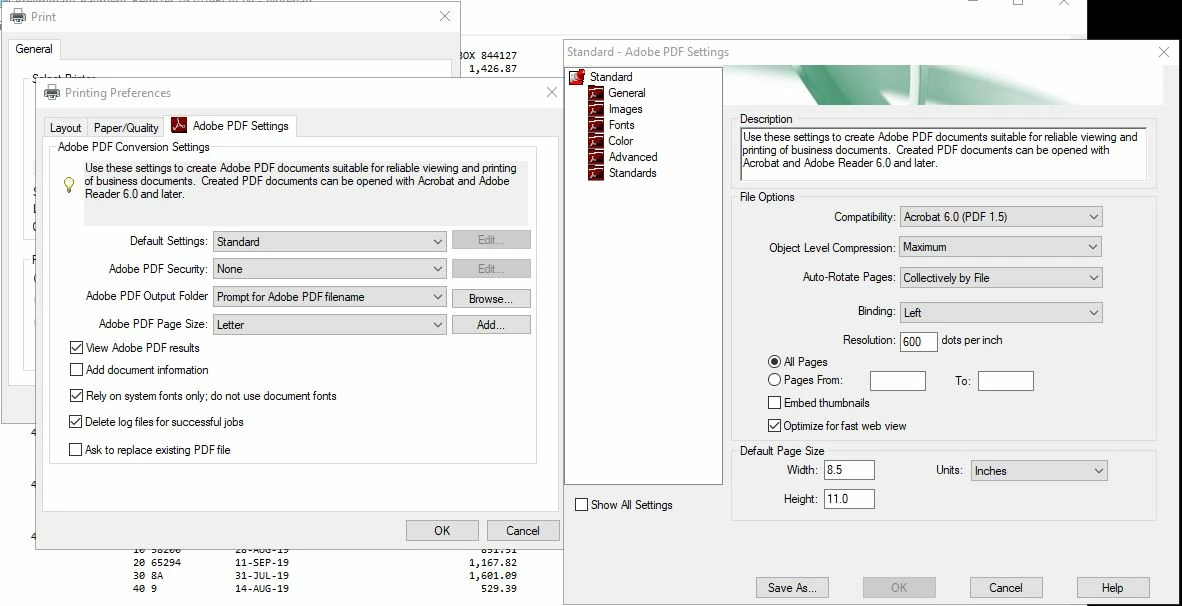
I suspect there is an option in ther printer prederence settings, image included, but I can't figure it out for the life of me.


Is there a way to print to PDF without adobe adding to the document?
    This topic has been closed for replies.
    Correct answer Dov Isaacs

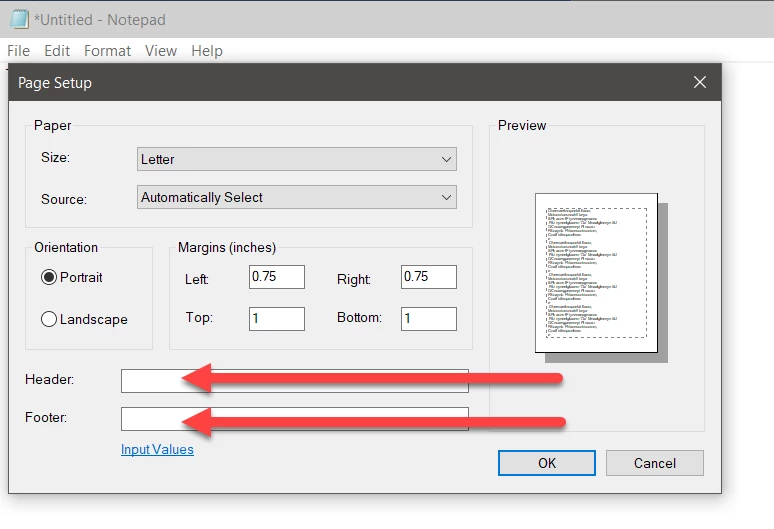
    Actually it is absolutely not Acrobat that is adding the page number. It is Notepad that is adding the page number as part of its printing process. This is controlled by the parameters in the Page Setup dialog.


    Access the Page Setup dialog via File=>Page Setup and then clear the values in the Header and Footer fields and press OK:


    You might want to adjust the Margins values to meet your needs. After fixing these fields in Notepad your problem will go away for both PDF creation via the Adobe PDF PostScript printer driver instance and any actual printing you do of this content.


                   - Dov

    1 reply

    Dov Isaacs
    Dov IsaacsCorrect answer
    Legend
    October 3, 2019

    Actually it is absolutely not Acrobat that is adding the page number. It is Notepad that is adding the page number as part of its printing process. This is controlled by the parameters in the Page Setup dialog.


    Access the Page Setup dialog via File=>Page Setup and then clear the values in the Header and Footer fields and press OK:


    You might want to adjust the Margins values to meet your needs. After fixing these fields in Notepad your problem will go away for both PDF creation via the Adobe PDF PostScript printer driver instance and any actual printing you do of this content.


                   - Dov

    - Dov Isaacs, former Adobe Principal Scientist (April 30, 1990 - May 30, 2021)
    November 18, 2019

    Dov, thank you very much for your answer. 


    Notepad is so bare bones I never imagined it would alter my document as a part of the printing process.


    This will save me tremendous greif and is much appreciated.