donnah97318636
Participant
August 24, 2018
Answered

Stop Other Versions from saving over the top of my password protected file

  • August 24, 2018
  • 1 reply
  • 1003 views

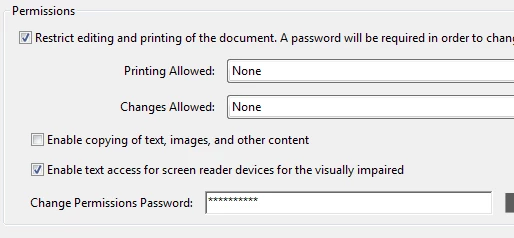
I password protected a file today and have it set for no editing or printing because staff were saving their version of the file from their desktops that were old as the master file.  After protecting the file, I tested saving a copy from my desktop to the master file and it saved my old version again even though I have a password on the master file????  How do I prevent others from saving their file over my master?  Here are the settings:
This topic has been closed for replies.
Correct answer Abambo
Discussion successfully moved from Adobe Experience Cloud to Editing & Exporting PDFs


The password only protects changing the file by editing the file, not from file overwriting.

Your users simply overwrite your file for a reason unknown to me with their version of the file. The last over-writer wins...

To avoid that, you need to ​write protect the file using your OS. There is nothing Adobe Acrobat can do here for you, as it even does not get a chance to intervene.

1 reply

Jantzen.Belliston
Adobe Employee
Adobe Employee
August 24, 2018

Hi,

Can you tell me which Adobe product you are using? This question is currently posted in our Experience Cloud community and I don't recognize the interface shown in your screenshot. Based on what you've provide, I think it likely belongs somewhere in our Adobe Creative Cloud​ or Adobe Document Cloud​ community. If you can tell me a bit more about which product you are using, I can make sure it gets moved to the correct area.


Thanks,
Jantzen

donnah97318636
Participant
August 24, 2018

Hi,

Here's what I am using:

Abambo
Community Expert
Community Expert
August 24, 2018
Discussion successfully moved from Adobe Experience Cloud to Editing & Exporting PDFs

ABAMBO | Hard- and Software Engineer | Photographer