
Inspiring
December 9, 2020
Answered

submit button to change appearance based on fields

  • December 9, 2020
  • 1 reply
  • 1491 views

In my form I have a signature field and a date field with a submit button below it. My goal is when either both or one of these fields are empty the submit button is grey and read only. It becomes enabled only after both fields are entered. My script works beautifully with the signature field, but the date field doesn't seem to effect the button regardless.


Here is my script:

if ((this.getField("Employee_Signature").value.length === 0)&&(this.getField("Date").value.length === 0)){
this.getField("Submit").fillColor = ["RGB", 192/255, 192/255, 192/255];
this.getField("Submit").readonly = true;
} else {
this.getField("Submit").fillColor = ["RGB", 0/255, 170/255, 0/255];
this.getField("Submit").readonly = false;
}


I have this script running in both the signature field and the date field. Here is the location of the signature field script:
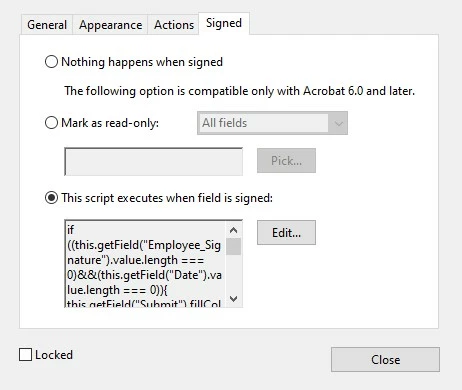
and here is where I have it for the date field:

 My script doesn't appear to have any errors, I've tested it, but is it missing something? Or am I putting the script in the wrong place?

This topic has been closed for replies.
Correct answer staceym73714452

Remove the script from the signature field. Use the one I provided as the calculation script of the date field.


Thank you for all your help. It turns out the script was still missing something. I believe it was still only reading that as long as one of the two fields had a value greater than 0 then it was ok to enable the button, but both fields needed to be greater than zero. This final script is really rough, but it works exactly how I need it to. If someone can rewrite my script to do the same thing but not as messy please do!!!


if (!(this.getField("Employee_Signature").value.length == 0) && !(event.value.length == 0)){
this.getField("Submit").fillColor = ["RGB", 0/255, 170/255, 0/255];
this.getField("Submit").readonly = false;
} else {
this.getField("Submit").fillColor = ["RGB", 192/255, 192/255, 192/255];
this.getField("Submit").readonly = true;
}

1 reply

try67
Community Expert
Community Expert
December 9, 2020

In the latter, change this line:

this.getField("Date").value

To:

event.value

Inspiring
December 10, 2020

So my script for both the signature field and the date field still would be the same but like this instead?


if ((this.getField("Employee_Signature").value.length === 0)&&(event.value.length === 0)){
this.getField("Submit").fillColor = ["RGB", 192/255, 192/255, 192/255];
this.getField("Submit").readonly = true;
} else {
this.getField("Submit").fillColor = ["RGB", 0/255, 170/255, 0/255];
this.getField("Submit").readonly = false;
}


Am I putting the script in the correct locations?

try67
Community Expert
Community Expert
December 10, 2020

No, that's not what I said. The version with event.value should only be used under the text field.