
Participating Frequently
April 27, 2024
Answered

submit pdf to php server challenge

  • April 27, 2024
  • 1 reply
  • 3305 views

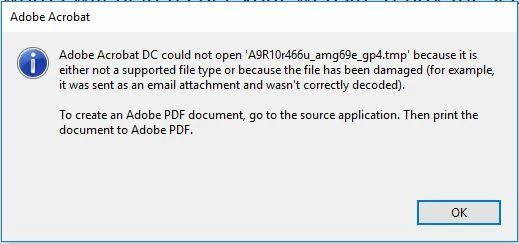
I wish to submit the entire PDF form to a PHP server in Adobe Acrobat. The server-side code is provided below. The PDF file can be saved in the server folder, but Adobe Acrobat throws the error as shown in the screenshot.

Seeking advice from experts on how to simply echo "submit successful!" or perhaps, since the transmission is already functioning, at least silence this error?


CODE:

<?php
header('Content-Type: application/pdf; charset=UTF-8');
header('Content-disposition: inline');

$data = file_get_contents('php://input');
$timestamp = time();
$randomNumber = mt_rand(1000, 9999);
$save = file_put_contents('C:\\test\\' . $timestamp . $randomNumber .'test_.pdf', $data);

?>


BUG ALERT:
 

This topic has been closed for replies.
Correct answer Thom Parker

I did some testing and discovered that there has to be a line feed after the first line. But only there.

Both of these PHP work to return a message to the user after the submit.


<?php
header("Content-Type: application/vnd.fdf; charset=UTF-8");
echo "%FDF-1.2\n1 0 obj<</FDF<</Status (Submit was Successful)>>>>endobj trailer << /Root 1 0 R >> %%EOF";
?>


<?php
header("Content-Type: application/vnd.fdf; charset=UTF-8");
echo "%FDF-1.2\n1 0 obj<</FDF<</JavaScript<</After (app.alert('Submit was successful',2))>> >> >>endobj trailer << /Root 1 0 R >> %%EOF";
?>


1 reply

Thom Parker
Community Expert
Community Expert
April 27, 2024

The header lines are for the HTTP Response, which is not set.  The script is returning an empty string, but Acrobat is expecting a PDF file, which is why the error is being reported.


But try this


header('Content-type: application/vnd.fdf');

echo "%FDF-1.2 1 0 obj<</FDF<</JavaScript<</After (app.alert('Done'))>> >> >>endobj trailer << /Root 1 0 R >> %%EOF";


Thom Parker - Software Developer at PDFScriptingUse the Acrobat JavaScript Reference early and often
Thom Parker
Community Expert
Thom ParkerCommunity ExpertCorrect answer
Community Expert
April 27, 2024

I did some testing and discovered that there has to be a line feed after the first line. But only there.

Both of these PHP work to return a message to the user after the submit.


<?php
header("Content-Type: application/vnd.fdf; charset=UTF-8");
echo "%FDF-1.2\n1 0 obj<</FDF<</Status (Submit was Successful)>>>>endobj trailer << /Root 1 0 R >> %%EOF";
?>


<?php
header("Content-Type: application/vnd.fdf; charset=UTF-8");
echo "%FDF-1.2\n1 0 obj<</FDF<</JavaScript<</After (app.alert('Submit was successful',2))>> >> >>endobj trailer << /Root 1 0 R >> %%EOF";
?>


Thom Parker - Software Developer at PDFScriptingUse the Acrobat JavaScript Reference early and often
Participating Frequently
April 28, 2024

Hi Parker again, thanks to your kind reply. After several hours' testing, I might finally came to the mechanism of acrobat-php communication. 


It seems that, no matter what one might sumbmitted to the php server via the acrobat build-in SUBMIT TO function, the acrobat end asks for a reply from the server, and this reply must be a FDF format. Therefore, if the uploader use header  [header('Content-Type: application/pdf; charset=UTF-8');], the php server feedback kept asking the acrobat end an fdf format temp file to render, which is hard to locate since the sending file is the entire pdf document.


However, according to my tests, the solution is just simple. To send the entire pdf document via acrobat build-in SUBMIT TO function and recieve smooth echo from the php server, one just need to add one more header in the beginning of the php server end code.


Here is my code:

<?php
header('Content-Type: application/pdf; charset=UTF-8');
header('Content-Type: text/plain; charset=UTF-8');
header('Content-Type: application/vnd.fdf; charset=UTF-8');
header('Content-disposition: inline');
$data = file_get_contents('php://input');
$timestamp = time();
$randomNumber = mt_rand(1000, 9999);
$save = file_put_contents('C:\\test\\' . $timestamp . $randomNumber .'test_.pdf',

$data);

echo <<<EOF
%FDF-1.6
1 0 obj
<<
/FDF
<<
/JavaScript
<<
/Doc 2 0 R
/After(confirmSend())
>>
>>
>>
endobj
2 0 obj
[
(confirmSend) 3 0 R
]
endobj
3 0 obj
<<
>>
stream
function confirmSend()
{
app.alert({
cTitle : 'Submission Result',
cMsg : 'Your form named' + ' ' + this.getField("name1").value + ' ' + ' is

submitted.',
nIcon : 3
});
}

endstream
endobj
trailer
<<
/Root 1 0 R
>>
%%EOF
EOF;

?>


Although it seems no geek, but functions well. The php server end echoed a js back to the acrobat end, and the latter rendered the js successfully with fdf data as both ends communicated in the [header('Content-Type: application/vnd.fdf; charset=UTF-8');].