Participant
September 17, 2026
Question

Suddenly unable to access "Recent files", can't open any of my saved PDF files

  • September 17, 2026
  • 2 replies
  • 23 views

I've been working on a document with some colleagues, where we would add comments to a PDF uploaded to Acrobat. It had been working fine until this morning, when I tried to open it, the whole page is blank and says “Something went wrong. Please try again later."

I've tried opening it using the sharing link across multiple devices, and even used different accounts. But the same message pops up. 

If it matters, one of my colleagues edited it last night as a guest. I had been getting emails about each comment he leaves, but I stopped receiving these updates halfway through when he was working on it.

When I try to access it from my Recent files, it just loads forever and none of my files pop up. Sometimes a message in red pops up saying “Unable to display Recent files. Please check later."

Thank you so much!

    2 replies

    creative explorer
    Community Expert
    Community Expert
    September 22, 2026

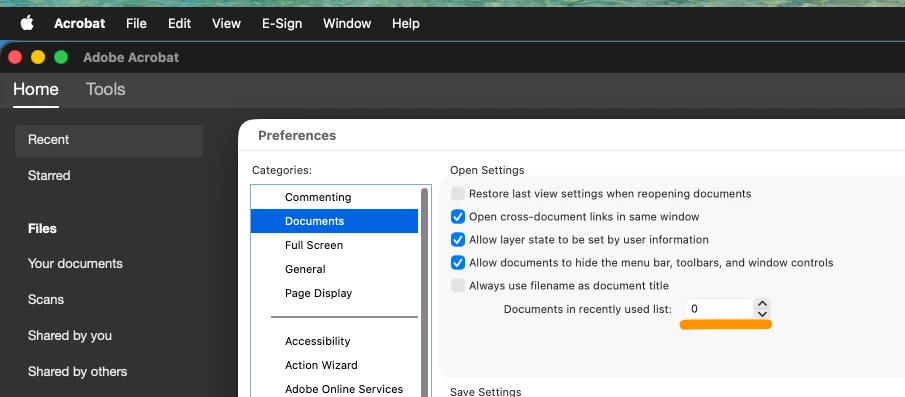
    @curious_Wave7e9a Besides what ​@Meenakshi Negi has suggested and asked for; Have you checked with your colleague to see if they can still access the PDF? If they can, ask them to generate a new sharing link. The current shared review session or link might have become corrupted, which could explain why you're seeing the error across multiple devices and accounts. Also, look inside your preferences of Acrobat that the recent files is not ‘zero’ and enter a number. If it’s zero, then no recent files will be shown


    m
    Meenakshi Negi
    Community Manager
    Community Manager
    September 18, 2026

    Hi curious_Wave7e9a,


    Thank you for reaching out, and sorry for the trouble caused.


    As per your description, the file shared with you is not ooening and showing the error message. Please try to check with the person who has shared the file initially. If there were any changes made.

    When you say none of the files, do you mean you have issues with other files as well. For a better understanding of the issue and to help us investigate this behavior further, please provide the following information:

    • A short video demonstrating the steps you are taking.

    • The complete version number of Acrobat you are using.

    • The operating system on your machine.

    • Please let us know if the issue occurs with a specific PDF or with all files.

    Once we have this information, we can further investigate this problem.

    We look forward to your response.


    Thanks,

    Meenakshi