
Dan6777
Participating Frequently
August 29, 2021
Question

Sum of entered numeric values

  • August 29, 2021
  • 2 replies
  • 1222 views

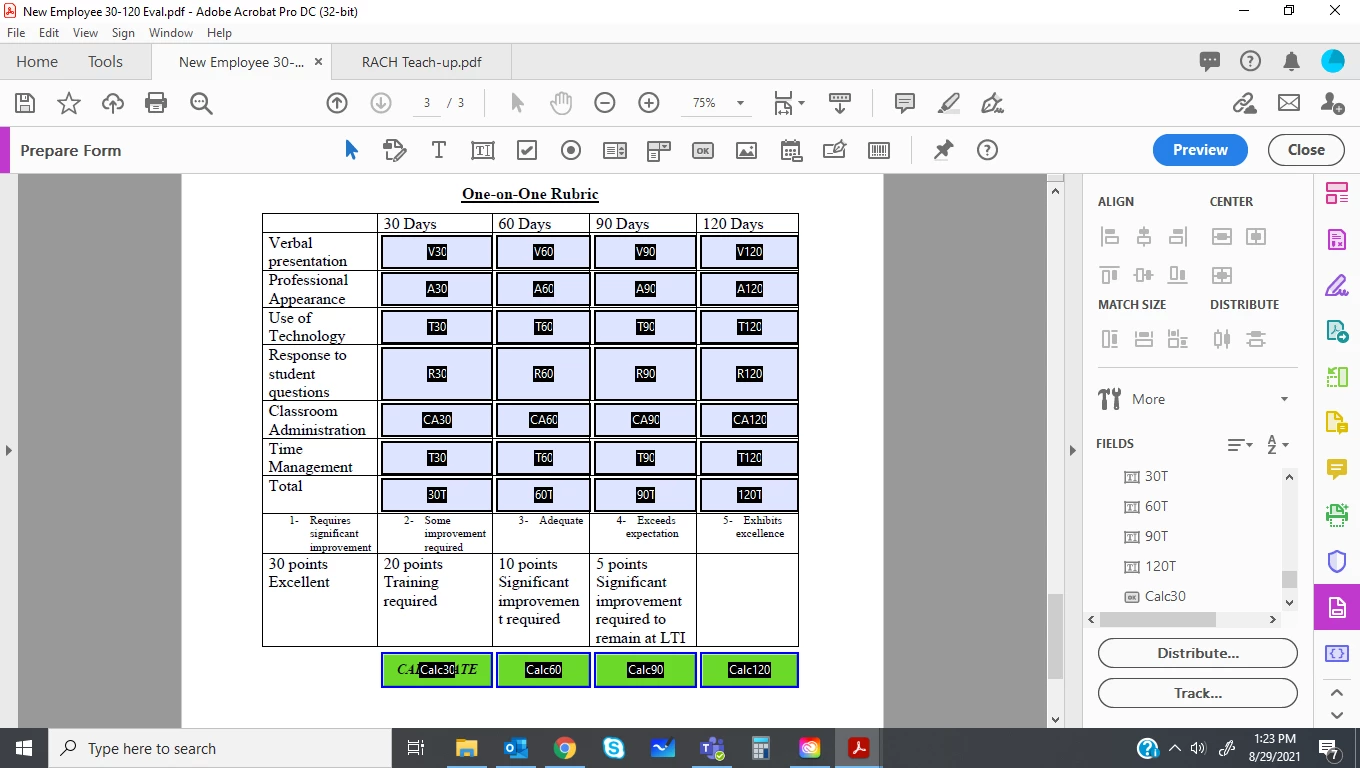
I am making a form for a new instructor evaluation. There are 6 criteria that are to be used and then added up. I created a "Calculate" button for each column and I would like to have the button run a script and place the total in the "Total" field. Then, depending on number in the total field, i would like the background color of that cell to change. 


Can I do all of this from one script? I know that i may have to change the names of the fields so the script would work but before i did that, i wanted to throw the question out into the aether. 
This topic has been closed for replies.

2 replies

Thom Parker
Community Expert
Community Expert
August 29, 2021

The simplest solution would be to use calculation scripts on the total fields.  But if the calculation buttons are really needed, then yes, you can use a MouseUp script on each button to perform the calculation and change field colors. 

And Yes you can write one script that will work for all the calculations, and it can be exactly the same script with no changes for field names.  The trick to writing this type of script is the field naming. The fields have to be named in such a way that the script can automatically generate the names from the name of the field executing the script, i.e, the button name in this case.


You're names are not the best, but they'll do.  For example, the buttons are all named with the pattern "Calc##".  The script would extract the "##" from the end of the name and then use it to build the required fields names like this:


var strColName = event.targetName.match(/\d{2,3}$/)[0];

var oFldTotal = this.getField(strColName + "T");
oFldTotal.value = Number(this.getfield("V"+strColName).value) + Number(this.getfield("A"+strColName).value) +  ...etc.

if(oFldTotal < 10)
   oFldTotal.fillColor = color.red;
else if (oFldTotal < 20)
   oFldTotal.fillColor = color.blue;
 ...etc...


Thom Parker - Software Developer at PDFScriptingUse the Acrobat JavaScript Reference early and often
try67
Community Expert
Community Expert
August 29, 2021

Just bear in mind that you'll need to disable the fields highlighting in order to see the fill color, unless you set them as read-only...


Edited: Disable the fields highlighting, not display it, of course...

Nesa Nurani
Community Expert
Community Expert
August 29, 2021

You can use script at validation of total field, just change values and colors to what you want them to be and add more 'else if' statements as needed:

if(event.value == 1)event.target.fillColor = color.green;
else if(event.value == 2)event.target.fillColor = color.yellow;

Dan6777
Dan6777Author
Participating Frequently
September 2, 2021

I used the following adaptation and im getting a XML error at line 2:


if(event.value =<= 5)event.target.fillColor = color.red;
else if(event.value= >5 && <=10 )event.target.fillColor = color.yellow
else if(event.value =>10 && <=20 )event.target.fillColor = color.green;
else if(event.value =>20 && <=30 )event.target.fillColor = color.dark green;

try67
Community Expert
Community Expert
September 2, 2021

You can't invent new operators and expect them to work.
The only allowed comparison operators are:

==

===

!=

!==

>

<

>=

<=