Participating Frequently
January 10, 2025
Answered

sum to trigger a check box

  • January 10, 2025
  • 1 reply
  • 2129 views

Hi! 

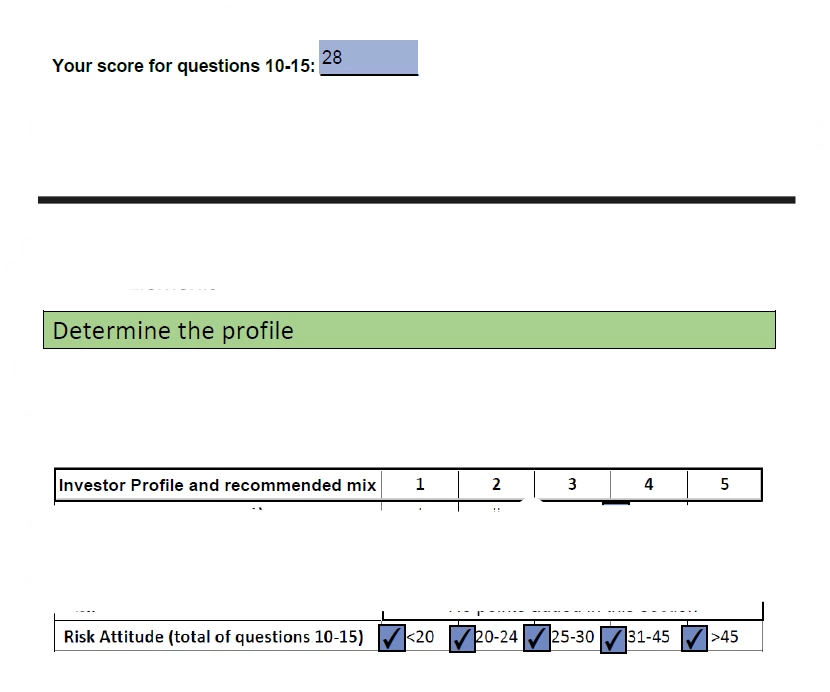
I'm trying to have a sum range trigger the showing of a check mark on a field. 


For example if sum total is 19 a check mark will show up in box 1 because it is below 20.

If sum total is 28 a check mark will show up in box 3 becasue it is between 25-30.

I'm a novice at Adobe and your help is greatly appreciated! 


Correct answer PDF Automation Station

Enter the following custom calculation script in the Sum field and change the field names to match your check boxes:

event.value<20?this.getField("Check Box1").checkThisBox(0,true):this.getField("Check Box1").checkThisBox(0,false);
(event.value>19 && event.value<25)?this.getField("Check Box2").checkThisBox(0,true):this.getField("Check Box2").checkThisBox(0,false);
(event.value>24 && event.value<31)?this.getField("Check Box3").checkThisBox(0,true):this.getField("Check Box3").checkThisBox(0,false);
(event.value>40 && event.value<46)?this.getField("Check Box4").checkThisBox(0,true):this.getField("Check Box4").checkThisBox(0,false);
event.value>45?this.getField("Check Box5").checkThisBox(0,true):this.getField("Check Box5").checkThisBox(0,false);

1 reply

PDF Automation Station
Community Expert
Community Expert
January 10, 2025

Enter the following custom calculation script in the Sum field and change the field names to match your check boxes:

event.value<20?this.getField("Check Box1").checkThisBox(0,true):this.getField("Check Box1").checkThisBox(0,false);
(event.value>19 && event.value<25)?this.getField("Check Box2").checkThisBox(0,true):this.getField("Check Box2").checkThisBox(0,false);
(event.value>24 && event.value<31)?this.getField("Check Box3").checkThisBox(0,true):this.getField("Check Box3").checkThisBox(0,false);
(event.value>40 && event.value<46)?this.getField("Check Box4").checkThisBox(0,true):this.getField("Check Box4").checkThisBox(0,false);
event.value>45?this.getField("Check Box5").checkThisBox(0,true):this.getField("Check Box5").checkThisBox(0,false);
Participating Frequently
January 10, 2025

Oh Whoa! Thank you!

When I run the above provided formula, it now removes the sum value (first option provided by the system) that was selected. 

Is there a way to have both options? Sum and Custom?


Nesa Nurani
Community Expert
Community Expert
January 10, 2025

No, you can't have both options, but you can add the calculation to your current script, add this to custom calculation script (above your script):

var total = 0;
for(var i=10; i<=15; i++){
 var f = this.getField(""+i).valueAsString;
 if (f !== "" && !isNaN(Number(f)))
  total+=Number(f);}
event.value = total;