


Participant
April 12, 2021
Answered

Suppress Adobe PDFmaker is disabled in Outlook

  • April 12, 2021
  • 2 replies
  • 1987 views

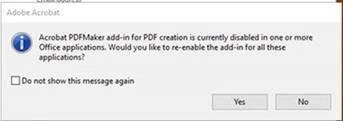
we are upgrading from Adobe Acrobat  20.006.20042 to 21.001.20138 as windows update using SCCM. The tool that we use is unable to change the command line to remove the pdf make addin. We have GPO in place to disable the acrobat pdf maker plug-in in outlook. The issue is that every time the user opens Acrobat they get a message saying "Acrobat PDFmaker add-in for PDF creation is disabled in one or more Office applications. Would you like to re-enable the application"? We do not want the add-in to enable, is there a way to suppress the message
Correct answer Tariq Dar

For Acrobat DC: 


! Caution

This procedure involves editing the Windows registry. Adobe doesn't support editing any Windows registry that contains critical system and application information. Make sure to back up the registry before editing it. For more information about the registry, see the Windows documentation or contact Microsoft®.


This registry is for Admin and IT professionals to make bulk changes in deployed environments. 


Please check the file attached to this response. And let us know how it works. 


Best regards,
Tariq | Adobe Community Team

2 replies

Participant
July 18, 2025

Anyone find a fix for this?

What really bothers me is PDFMaker add-on isn't even installed (excluded during installation) and the Office GPO is set to prevent the add-on from starting or even being enabled by the user.

Because the plug-in isn't installed, nothing happens if you say yes. However, the presence of the message generates helpdesk calls and I would really like to prevent it from appearing


I did a windiff on the hku\software\adobe registry tree and the system makes 21 edits after you click on the don't show box, click no, and close Acrobat. None seem to correspond to supressing the message.


Legend
August 14, 2025

I am checking internally whether we can prevent this prompt from appearing again, especially once the deployment of Acrobat is complete and restrictions are in place to enable it. 
Thank you for your patience and sharing your feedback. 


Best regards,
Tariq | Adobe Community Team

Participant
September 2, 2024

Hello juicemotoxqa,


Were you able to find a solution for this?


We also want to suppress that message from all users.


Thanks!

S_S
Community Manager
Community Manager
September 5, 2024

Hi @imkryz,


Hope you are doing well. Thanks for writing in!


Cannot guarantee if this is the answer you are looking for, but I could think of some registry value, that can be used to disable the PDFMaker plugin in general, and the pop-ups.


Close Acrobat and Outlook from Task Manager.


Then click on Start Menu-> Run-> type "regedit." Once there, this would be the location:

HKEY_LOCAL_MACHINE\SOFTWARE\Microsoft\Office\Outlook\Addins\PDFMOutlook.PDFMOutlook


Once there, change the value for Reg_Word "Load Behavior" to 2.


Once done, restart Outlook and Acrobat and let me know is this helps.


-Souvik

Participant
September 20, 2024

Hi Souvik, this instruction will disable the Add-in for Outlook. What the question reffered to is, once the plug-in is set to not load, everytime you open a PDF this above prompt is popped up. How can we adjust the registry to not pop up this prompt? The tick box on that pop will set a key in the registry to not pop-up this warning again. Cna we get the location of that key so we can supress this from ever popping up?