


Participant
March 18, 2026
Question

Table Regularity

  • March 18, 2026
  • 1 reply
  • 27 views

How do I fix table regularity when I can’t open/select one of my cells to edit?


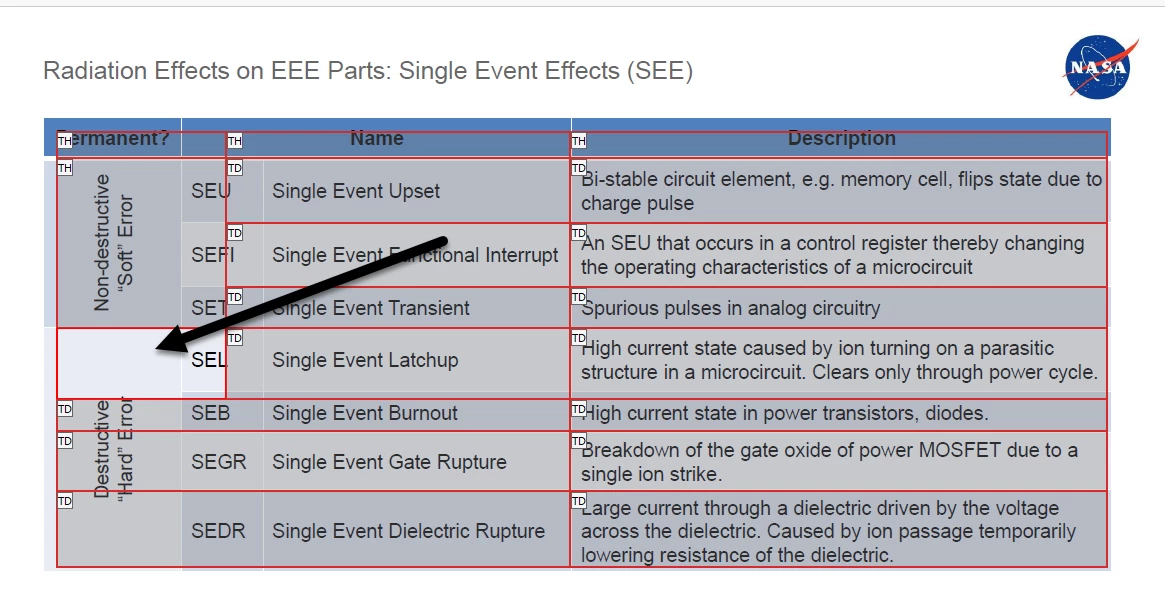
I have an irregular table. I was able to set the row span for the first of two cells that are merged across multiple spans, yet the second sell that needs the row span adjusted will not open the Cell properties (pictured below with an arrow pointing to the empty cell that is not listed as a TD or TH, yet it’s a TH in the accessibility tags tree). 


    1 reply

    Legend
    March 25, 2026

    Hi ​@lindsay_3411

    Sorry for the delayed response, and thanks for reaching out. 

    Note: I have removed your attachment from this discussion; however, it helped us figure out a workaround for your issue. The attachment had some personal information. 


    Let us try that workaround: 

    1. Create a copy of your document
    2. Launch Acrobat > Menu > Preferences > Accessibility > Other Accessibility options
      1. Check “Enable Cloud-based auto-tagging” for accessibility
      2. Click Ok 
      3. Relaunch Acrobat (optional)
    3. Open the document > Tools > Prepare for Accessibility 
      1. Click “Automatically tag PDF.”
      2. Once done, save the document and check. 

    Let us know how it works. 


    ~Tariq