

Table shading bleeds over when PDF generated from Word file
The problem occurs every time I generate a PDF from a Word file that has a large table with merged shaded cells that has more than two rows extending past a page break. If the column's cells are split into individual rows, the problem does not appear in the generated PDF. It only appears when the column's cells are merged, and the merged portion extends at least two cells beyond the page break. Of course, it looks fine in the original Word file. It doesn't matter if all the cells in the table are blank. It doesn't matter if you have Keep Lines Together or Keep with Next ON or OFF.
It is easily reproduced and fails every time.
The problem occurs no matter if you generate from Adobe Acrobat, save to PDF, or print to PDF from Word. It happens on both Windows and Mac OS. I'm using Work 365 and Adobe Acrobat Pro DC Version 2019.012.20035.
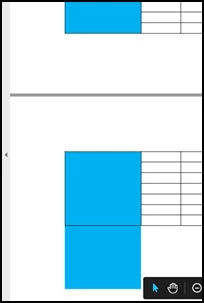
Has anyone else run into anything like this? I have tried various PDF compatibility settings to no avail. I'm stumped.
Thanks,
Ricky
 AdChoices