Participant
December 19, 2018
Answered

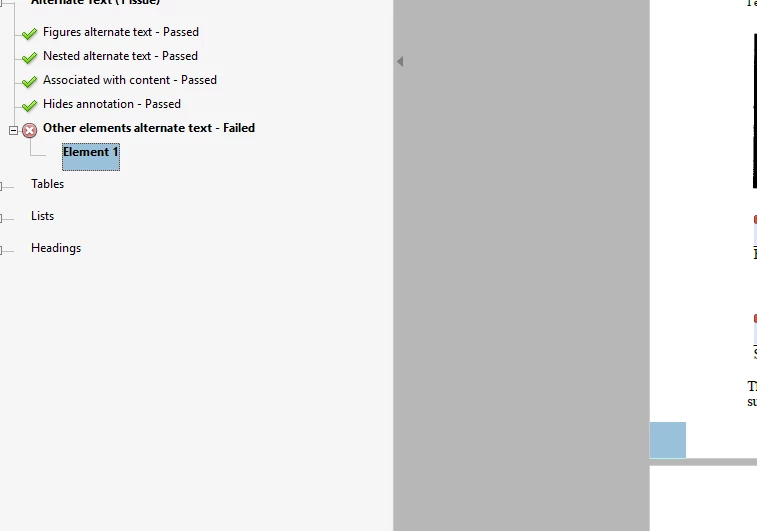
Tag failure - tagged content and other element alterate text (same issue)

  • December 19, 2018
  • 1 reply
  • 834 views

I have a 168 page PDF that I just finished fixing except I get flagged on the report for those two things on page 159.  They both are the same thing - when I click on either one, a small blue square gets highlighted at the left corner of the bottom.    When I click on "go to content" it says there is no content there.  When I zoom in, I don't see any defects or artifacts.

What gives?
This topic has been closed for replies.
Correct answer JMcCu

Try using the "Find" function (open your tags panel, right-click on any tag on page 168 and select "Find..."). Select unmarked content and click through all the unmarked items on the page (they will be highlighted in the same blue) until it lands on the items giving you trouble. If it finds the items click "tag element". It will add a tag for the item to your panel which you can then artifact and it should stop showing up as an error. The new tag can show up at the end of the document tagging structure, so search for it there if you're having issues finding it. Let me know if this works!

1 reply

JMcCu
JMcCuCorrect answer
Participant
January 4, 2019

Try using the "Find" function (open your tags panel, right-click on any tag on page 168 and select "Find..."). Select unmarked content and click through all the unmarked items on the page (they will be highlighted in the same blue) until it lands on the items giving you trouble. If it finds the items click "tag element". It will add a tag for the item to your panel which you can then artifact and it should stop showing up as an error. The new tag can show up at the end of the document tagging structure, so search for it there if you're having issues finding it. Let me know if this works!