
Known Participant
June 4, 2018
Answered

tagged PDF

  • June 4, 2018
  • 1 reply
  • 3159 views

I am using Acrobat XI pro in shared review. I want to extract the comments to, preferably an Excel file to manage the resolution of the comments in a tabulated form. I see that in the comments, the option available is to export to Word. But on trying to do so gives me a message that the PDF I am working on is not a tagged one.

"Change conversion settings from Adobe PDF menu and check the box labeled, enable accessibility and reflow with tagged PDF".

I am not able to see where the settings are available in the XI pro. Can anyone please help, how I may convert to a tagged PDF?
This topic has been closed for replies.
Correct answer Document Geek

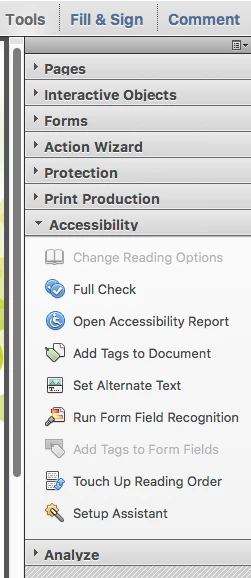
I think this may be what you are after. Tools > Accessibility > Add Tags to Document.

1 reply

Document Geek
Community Expert
Document GeekCommunity ExpertCorrect answer
Community Expert
June 4, 2018

I think this may be what you are after. Tools > Accessibility > Add Tags to Document.

Participant
April 15, 2021

I don't see the 'add tags to doc' link in the Acrobat DC that I am using. Instead there is a auto tag link. It merely makes some garbled content. I used another file which it said that it is tagged. I don't remember having done the accessibility step. When I tested it with a few comments inserted, and saving it with a new file name. It said that 'unable to find Adobe PDF resource files' 


Today I tried with Chat support and they were neither able to help. I wanted to export the comments to have a resolution sheet in Excel.

Participant
October 5, 2021

I'm facing the same issue with Acrobat DC, have you resolved it? kindly advise how?