
bhupathil1307
Known Participant
December 4, 2020
Question

Tagged PDF structure in Tag panel

  • December 4, 2020
  • 2 replies
  • 1399 views

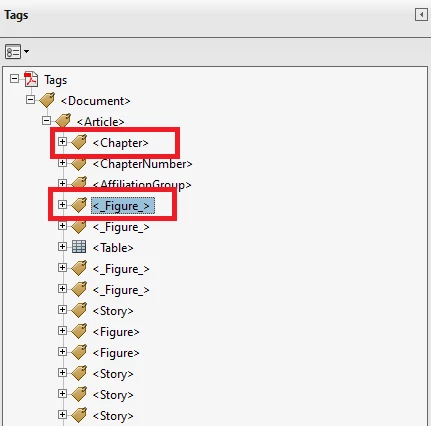
I've exported the PDF from InDesign and placed all figure captions in seprate text group with textwrap option. We found the output PDF tag structre is not correct as per page view. All the group are placed in the output side of root structre.

Example: I've placed the Figure 1 in page 4. In the PDF tag panel, figure group tag found outside of chapter root tag. See below screen shot FYR...
 

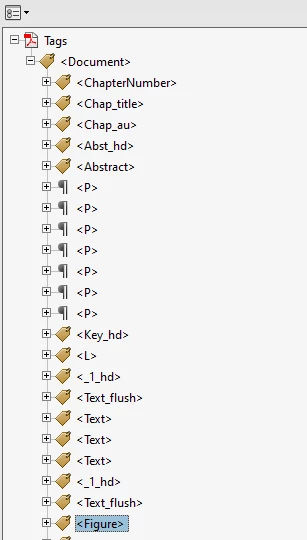
Required Output:
 

This topic has been closed for replies.

2 replies

December 4, 2020

<< I'm looking to re-arrange the tag tree structure in the automated way. >>


Not sure what you mean by that. Can you give some details?


<< Our client required the tag tree as sequence of PDF view.>>

Not sure what that means, either. But FYI, the PDF/UA-1 standard requires that the Tag tree be the source of information for all assistive technologies and accessibility.


<< In the PDF tag tree all the figure tag are found outside of root element>>

That's a huge failure of the PDF file itself; it's not building the PDF to the PDF specification and no technology will be able to process it correctly. Not sure WHY that happend. What was the source program from which the PDF was exported?


<< Need to move the figure/caption tag after the page 3 bottom paragraph.>>

In Acrobat, just drag and drop the tags where you want them in the Tag Tree.

But it's better if you could get to the source file, fix its accessibility shortcomings there, and the export a better, more compliant PDF.

Much less work!


bhupathil1307
Known Participant
December 14, 2020

<< I'm looking to re-arrange the tag tree structure in the automated way. >>

Not sure what you mean by that. Can you give some details?

>>We are creating the on-fly Web PDF(with accessbility WCAG 2.1 sepcification) in InDesign Server. The Output Web PDF will move to client directly without manual intervention. So, there is no option to do the manual adjustment in PDF before sending to client in our workflow.


<< Our client required the tag tree as sequence of PDF view.>>

Not sure what that means, either. But FYI, the PDF/UA-1 standard requires that the Tag tree be the source of information for all assistive technologies and accessibility.

>>Tag tree not matching with PDF View, if we client the tag one by one in order


<< In the PDF tag tree all the figure tag are found outside of root element>>

That's a huge failure of the PDF file itself; it's not building the PDF to the PDF specification and no technology will be able to process it correctly. Not sure WHY that happend. What was the source program from which the PDF was exported?

>> The PDF was exported from InDesign and already raised this issue to InDesign tech team


<< Need to move the figure/caption tag after the page 3 bottom paragraph.>>

In Acrobat, just drag and drop the tags where you want them in the Tag Tree.

But it's better if you could get to the source file, fix its accessibility shortcomings there, and the export a better, more compliant PDF.

Much less work!

>>Yes, I can able to move the placement of tags in Acrobt, but we need to avoid manual work and create the correct tag tree PDF with 100% automated way


Bevi Chagnon - PubCom.com
Legend
December 14, 2020

@bhupathil1307, the problems you describe are all caused by an incorrectly formatted InDesign source document.

Therefore, the solution is to fix the InDesign document (or create it correctly from the start) before exporting it to PDF.


NOTE: At this time, it is possible to export a PDF that is about 90% compliant  -- IF the InDesign document is created correctly with accessibility in mind. And the remaining 10% might be able to be scripted in Acrobat to complete it, or might not be significant enough barriers to matter much.


SUMMARY:

  • Your client's expectations and requirements are not correct. They need training in what makes a PDF accessible.
  • Your knowledge of accessible PDF  -- especially the InDesign -to-PDF workflow -- is weak. Get training in this.
  • The only way to get a fairly good, accessible PDF from any software program is to make a good, accessible source file. And then export it to PDF. The structural problems you've described all come from a badly made InDesign file.


|&nbsp;&nbsp;&nbsp;&nbsp;Bevi Chagnon &nbsp;&nbsp;|&nbsp;&nbsp;Designer, Trainer, &amp; Technologist for Accessible Documents ||&nbsp;&nbsp;&nbsp;&nbsp;PubCom |&nbsp;&nbsp;&nbsp;&nbsp;Classes &amp; Books for Accessible InDesign, PDFs &amp; MS Office |
December 4, 2020

First, you're seeing InDesign's "crazy-named tags" in your tag tree (they're technically custom tags) and not the standard PDF tag set: example, <Story> is not a legal tag for accessibility, but <Art> for article is.

Change how you're seeing tags in Acrobat's Tags panel:

From the Tags Panel's options menu, select Apply Role Mapping To Tags (towards the bottom of the list) and you should now see better tags, at least with the proper names like <H1> rather than <_1_hd> and <P> rather than <Text>.


Which leads me to a suggestion: what you're experiencing is elementary accessibility from InDesign to PDF. If your training didn't cover this, consider getting more from a good source, such as www.PubCom.com/classes.


bhupathil1307
Known Participant
December 4, 2020

Thanks for the details.
I'm looking to re-arrange the tag tree structure in the automated way.
Our client required the tag tree as sequence of PDF view. Example, figure group placed in PDF page 4, but in the PDF tag tree all the figure tag are found outside of root element. Need to move the figure/caption tag after the page 3 bottom paragraph.