



MarcosRobertoSilva
Participant
June 10, 2026
Answered

Tagged PDF x Reading Order Issue

  • June 10, 2026
  • 1 reply
  • 66 views

Hi Support Team,

I faced with a new issue during the Tagged PDF implementation, now is with the reading order in “Read Out Aloud” option from Acrobat Reader.
 

Overview

 I created a simple example layout with some fake data, and I labeled it in the correct reading order :
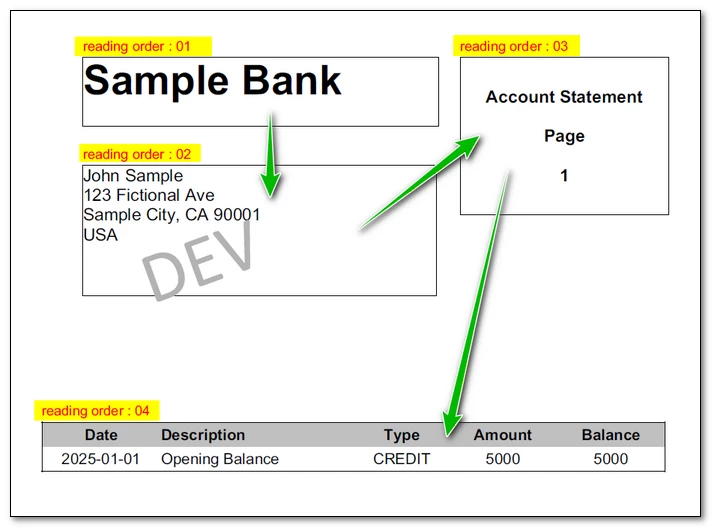
 

And this works correctly, but only for the first page.
The text in a yellow box are artifacts.


The issue

The problem starts from the second page onwards :
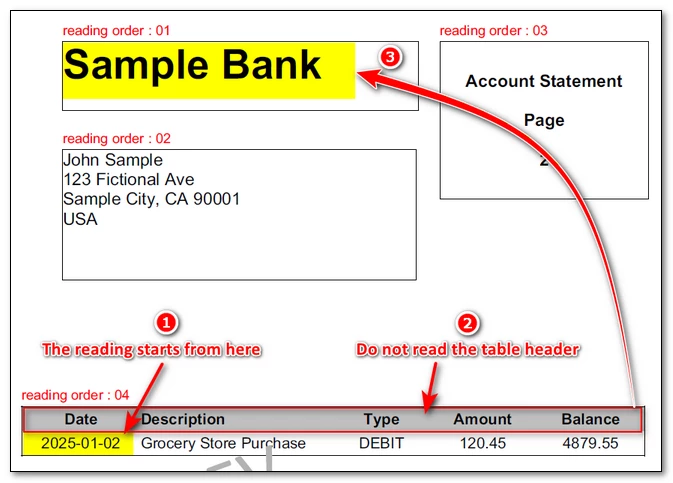


It starts the reading from the first line of table, ignoring the table´s header and finally goes to the first flow that should be the first reading, like the reading of the first page.
 

Structure

I´ve been tried to do some workaround and investigate some options but I didn’t find anything to fix it.
Investigating with PAC, we can see the documents structure and the flowArea4 only appears in the first page :
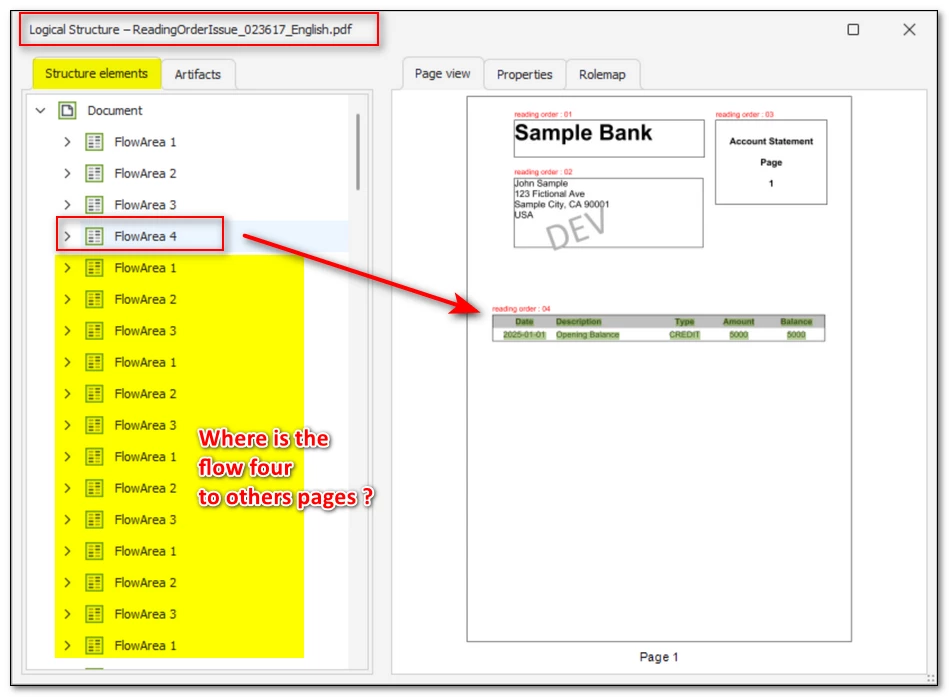

Analisis

Front of this I opened a ticket with the software vendor that I used to generate this test and they answered this :

"Unfortunately, this is by design and how Adobe Reader handles it.

Tags are properly generated and the whole table has all tags under one node.

It means that if Adobe Reader reads the content for this single record, it checks tags and sees that the table continues from the previous page, and the tag is before the actual content above it reads the table content first - because it is overflowing from the previous page.

We have tested NVDA reader, and it works as expected there, that's because it reads the text and then it mentions something like "table with 25 rows and 5 columns" and reads the whole table without any other text, which is how it should be handled, but Adobe Reader doesn't process it like that."


Conclusion

According with the answer the problem is with Acrobat Reader and I need to ask for my customers to use other solution.
I attached a zip file with the data input that I used to generate this proof, as well the pdf resulted and a short video with the reading resource option from Acrobat Reader.

Can someone help me with this issue ?

Kind regards
Marcos Silva


    Correct answer Tariq Ahmad Dar

    Hi ​@MarcosRobertoSilva,


    Thank you for providing the sample files, screenshots, and video. We reviewed the PDF with our engineering team and were able to identify why this behavior is occurring.

    Why this happens

    In a tagged PDF, assistive technologies read content according to the Tags panel structure rather than the visual appearance of the page.

    In your PDF, the Table Art is positioned in the Accessibility Tags structure after the page 1 header content, but before the header content on the following pages. Because of this placement, assistive technologies encounter the table content before they encounter the page headers on subsequent pages.

    As a result, the reading sequence you are hearing is based on the tag structure of the PDF, even though the visual layout on the page appears to be in the expected order.

    Why the table header is only announced once

    The table is tagged as a single table that continues across multiple pages. The header row is defined at the beginning of the table and is therefore announced when the table starts on page 1. The remaining pages contain continuation rows, so only the data cells are announced.

    This behavior is consistent with the current table tagging structure.

    Possible workaround

    You can adjust the tag order in Acrobat so the page header content is encountered before the continuing table content.

    1. Open the PDF in Acrobat Pro.
    2. Open the Tags panel.
    3. Locate the Table Art element in the tag tree.
    4. Move the Table Art lower in the tag hierarchy so that the page header content appears before it.
    5. Save the PDF and test again using your preferred assistive technology.

    After moving the Table Art, the reading sequence should follow the expected order, with the page header content being announced before the table data on subsequent pages.

    For additional information about working with tags and reading order in Acrobat, see:

    Thank you again for the detailed investigation and for sharing the test files. They were very helpful in identifying the underlying tag order issue.


    ~Tariq

    1 reply

    Community Manager
    June 11, 2026

    Hello ​@MarcosRobertoSilva,


    Thank you for taking the time to create a reproducible sample and for sharing the PDF, source data, screenshots, PAC analysis, video recording, and the feedback you received from the PDF generation vendor. The level of detail you provided is extremely valuable and has helped us better understand the behavior you are seeing.


    From your testing, it appears that Acrobat Reader’s Read Out Loud feature is processing the continued table structure differently on subsequent pages than on the first page. Your comparison with NVDA is particularly helpful, as it demonstrates that another assistive technology is able to interpret the document structure differently and produce the reading sequence you expected.


    At this point, we would like to review the scenario further with our product team. We have shared the details of your findings internally, including the sample document and the analysis you provided, so the behavior can be evaluated more closely.

    While this review is underway, you may wish to continue validating the reading experience using assistive technologies such as NVDA or JAWS, especially since your testing indicates that they are handling the document structure differently from Read Out Loud. The results from those tools can also provide useful additional context when assessing the accessibility experience of the document.


    We appreciate the thorough investigation and all the supporting materials you provided. Thank you again for bringing this to our attention and for helping us better understand this use case.


    ~Tariq

    MarcosRobertoSilva
    Participant
    June 11, 2026

    Hello Tariq,

    Thank you for your detailed response and for sharing my findings with your product team.

    I would like to clarify an important point regarding the behavior observed during my tests.

    Although NVDA reads the document differently compared to Acrobat Reader’s Read Out Loud, it is also not producing the expected result. In my tests, NVDA reads the entire table continuously until the end of the document, effectively ignoring the remaining content on subsequent pages.

    From an accessibility and logical reading perspective, the expected behavior would be for the content to be read page by page, following the order in which objects are placed on each page. Even if the table spans multiple pages, each page should be treated as an independent reading sequence, allowing all elements (including non-table content) to be read in the correct order.

    This distinction is important because both tools currently exhibit behaviors that do not fully align with the intended reading flow of the document.

    Please let me know if you need any additional samples or clarification. I would be happy to assist further in your analysis.

    Thank you again for your attention to this matter.

    Best regards,
    Marcos Roberto Silva

    Anand Sri Bhattacharya
    Community Manager
    Community Manager
    June 11, 2026

    Hello ​@MarcosRobertoSilva 


    I hope you are doing well, and thank you for sharing the details.


    We’ll get this investigated internally and will get back to you with an update.


    Thanks for your cooperation on this.

    Regards,

    Anand Sri.