

Syeds
Inspiring
January 10, 2024
Question

Tagging Accessible PDF Anomalies

  • January 10, 2024
  • 1 reply
  • 803 views

I am far into creating accessible PDFs but I have a few reoccuring things which I cannot figure them out. For example one of them is this:
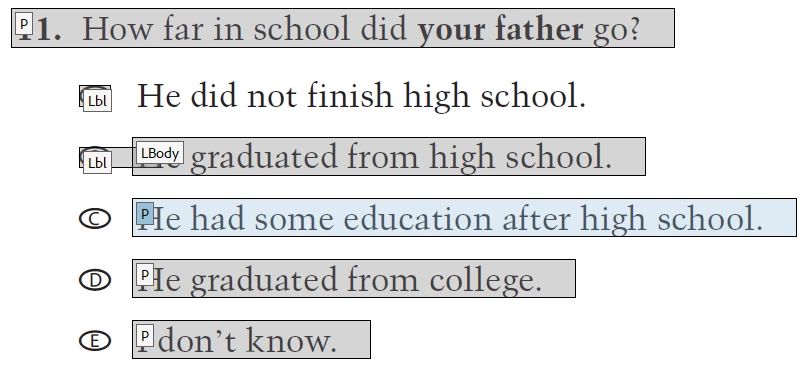
As soon as I select the box around to tag/order it disappears and I cannot get it back. It also is not in the Order/Tag panel. How do I create a new tag with the text and find in the panels?


This topic has been closed for replies.

1 reply

Amal.
Legend
January 11, 2024

Hi @Syeds


Hope you are doing well and thanks for reaching out.


Would you mind sharing the workflow/steps you are doing to create the PDF file with tags? A small video recording of the same would be very helpful.


Also go through the help pages listed below and see if that works:

- https://adobe.ly/41RJ7fy

- https://adobe.ly/47sUgEF


Hope this information will help.


~Amal

Syeds
SyedsAuthor
Inspiring
January 12, 2024


@Amal. 

'Thanks, I have reviewed the pages you referenced. And as far as the video I am unable to it, sorry. I really just need to know if or how or if a PDF text can be selected to be included in the reading order and tab pancel  manually and not by the Auto generated taggeding?

Bevi Chagnon - PubCom.com
Legend
January 12, 2024

Yes, Acrobat does have a tool panel that allows you to select text, graphics, and tables and tag them. They then will appear in the Tags Panel.


  1. From the ORDER panel, select Show Reading Order Panel from the drop-down menu in the upper left of the panel.
  2. This brings up a floating tool panel and your cursor will change to crosshairs.


  3. Using the crosshairs cursor, drag around the text you want to add to the tag tree. Once selected, choose the appropriate tag from the Panel.
  4. You should now see the text in the TAGS panel with its tag.


Hope this helps.


|    Bevi Chagnon   |  Designer, Trainer, & Technologist for Accessible Documents ||    PubCom |    Classes & Books for Accessible InDesign, PDFs & MS Office |