Participant
June 6, 2021
Answered

Tagging repeating table header

  • June 6, 2021
  • 1 reply
  • 10685 views

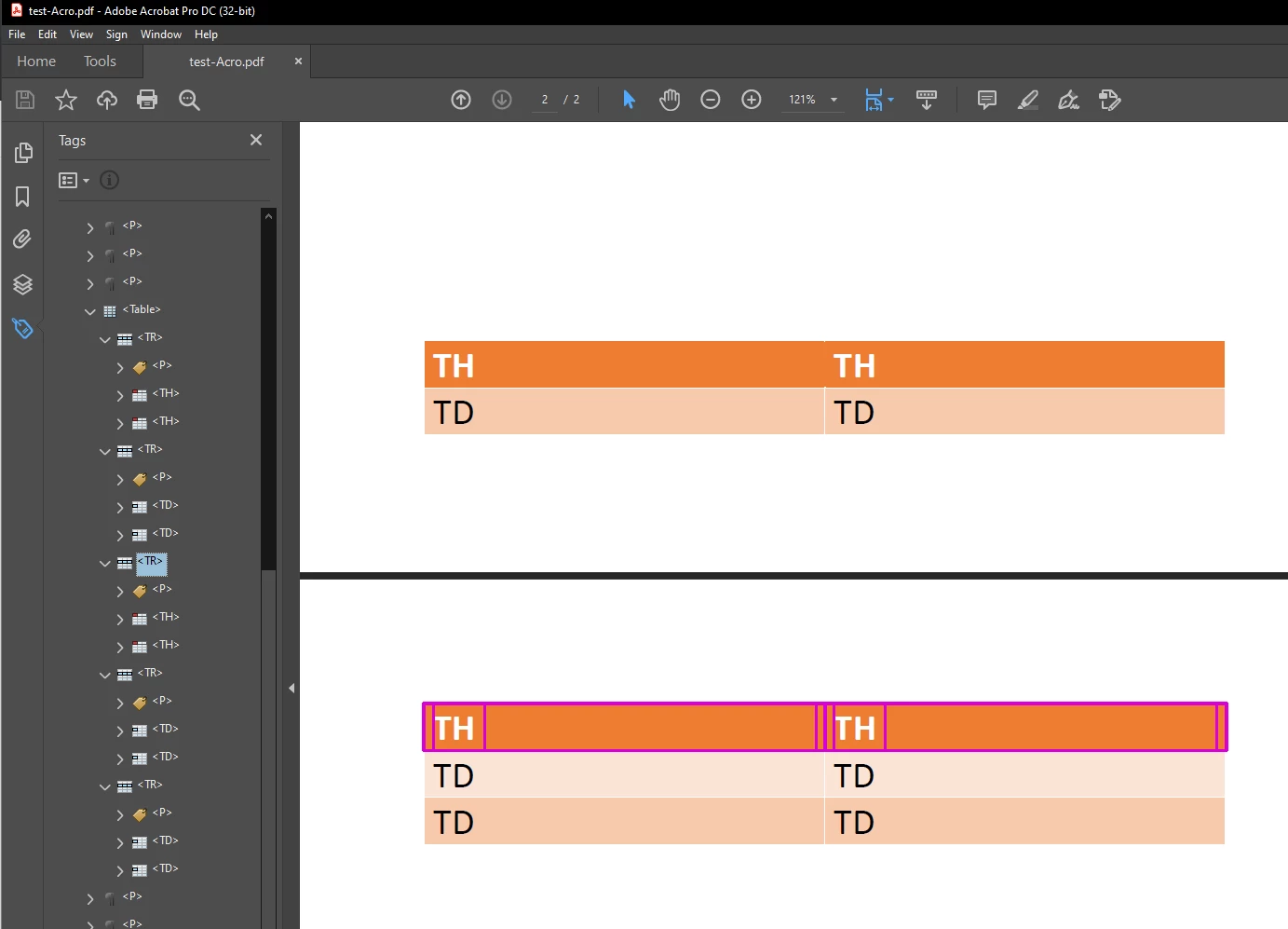
Can anyone suggest how to tag repeating table header rows when the table spans over the several pages regarding the PDF/UA and/or WCAG requirements? Should they be marked as pagination artifacts or maybe included into THead tag?

When I convert MS Word document to PDF via PDFMaker it tags repeating rows as regular TR. I assume it is not quite good for accessibility.

Correct answer Bevi Chagnon @ PubCom
quote
...I do not understand how to tag repeated header rows on second table page (third <TR> on my screen). And I did not found any recommendation on WCAG PDF Techiques pages and other resources.
By @2econd


Since you only want the headers to appear once in the <Table> tag, then every other instance shouldn't be tagged and, therefore, should be artifacted. Then entire <TR> and its cells and content should be artifacted.


I don't understand why people refer to WEB content accessibility guidelines when making accessible PDFs: they are 2 very different technologies. HTML is a markup language for content, while PDF is a programming language for a structured page-based visual document. The PDF info at WCAG is inaccurate and leaves out a great deal of what's needed for accessibility.


PDF asscessibility guidelines are published by the ISO (international standards organization, see ISO 14289 https://www.iso.org/standard/64599.html.  The PDF Association develops and maintains the standards for all types of PDF (archive, engineering, print, and more), including accessible PDFs, and you can find resources at their website. One to note: The PDF/UA Syntax Guide at https://www.pdfa.org/resource/tagged-pdf-best-practice-guide-syntax/




1 reply

Bevi Chagnon - PubCom.com
Legend
June 6, 2021
  1. No matter how many pages a table is on, the PDF tag tree should show just one <Table> tag, and one set of <TR>/<TH> header rows.  So, the entire table is in one <Table> tag with one repeating row (or rows, for example a header made up of 2 rows)
  2. There are 2 steps to designate the repeating header row(s) In MS Word:
    • Select the table and in the Table Design Ribbon at the top left, check the appropriate boxes for Header Row and First Column.
    • Select the table and right-click to bring up Table Properties. In the Row tab, UNcheck the option to split rows (that's an accessibility violation) and check to repeat the rows.


|&nbsp;&nbsp;&nbsp;&nbsp;Bevi Chagnon &nbsp;&nbsp;|&nbsp;&nbsp;Designer, Trainer, &amp; Technologist for Accessible Documents ||&nbsp;&nbsp;&nbsp;&nbsp;PubCom |&nbsp;&nbsp;&nbsp;&nbsp;Classes &amp; Books for Accessible InDesign, PDFs &amp; MS Office |
2econdAuthor
Participant
June 7, 2021

This is not quite the answer I wanted. Probably my question was not clear enough.


I do understand that table on two pages should be tagged with one <Table> tag. I do understand how to set up repeating header rows in MS Word. But I do not understand how to tag repeated header rows on second table page (third <TR> on my screen). And I did not found any recommendation on WCAG PDF Techiques pages and other resources.

Bevi Chagnon @ PubCom
Bevi Chagnon @ PubComCorrect answer
Participating Frequently
June 8, 2021
quote
...I do not understand how to tag repeated header rows on second table page (third <TR> on my screen). And I did not found any recommendation on WCAG PDF Techiques pages and other resources.
By @2econd


Since you only want the headers to appear once in the <Table> tag, then every other instance shouldn't be tagged and, therefore, should be artifacted. Then entire <TR> and its cells and content should be artifacted.


I don't understand why people refer to WEB content accessibility guidelines when making accessible PDFs: they are 2 very different technologies. HTML is a markup language for content, while PDF is a programming language for a structured page-based visual document. The PDF info at WCAG is inaccurate and leaves out a great deal of what's needed for accessibility.


PDF asscessibility guidelines are published by the ISO (international standards organization, see ISO 14289 https://www.iso.org/standard/64599.html.  The PDF Association develops and maintains the standards for all types of PDF (archive, engineering, print, and more), including accessible PDFs, and you can find resources at their website. One to note: The PDF/UA Syntax Guide at https://www.pdfa.org/resource/tagged-pdf-best-practice-guide-syntax/