

Participant
September 13, 2024
Answered

Tax Calculations

  • September 13, 2024
  • 3 replies
  • 919 views

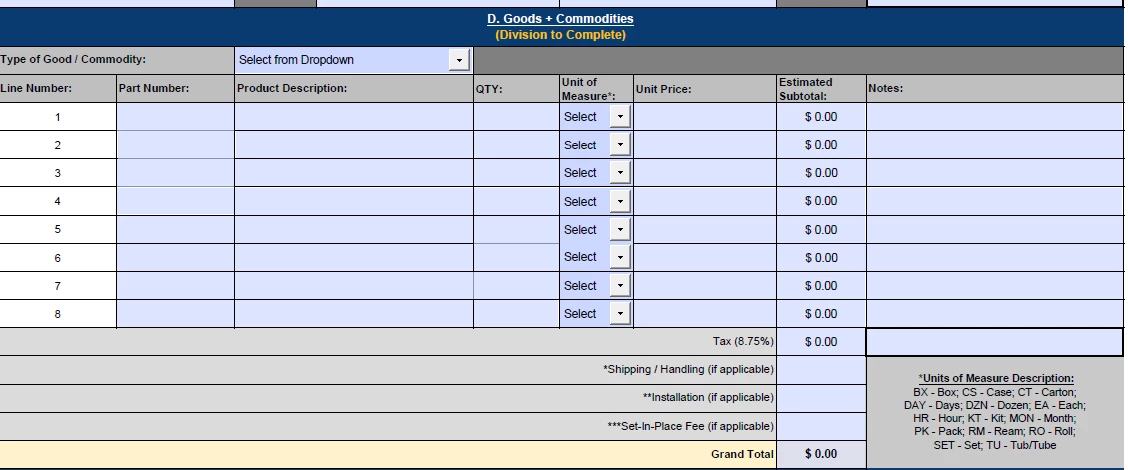
I'm trying to create a form that will calculate tax on the lines that are marked "taxable". I want to add checkboxes for taxable (Y/N), but I don't know how to create the script to calculate tax on only "Y" marked lines.

 

Correct answer PDF Automation Station

First, rename field Text95 to Text94 and change the Subtotal calculation to reflect this change.  Name your check boxes Tax87 through Tax94 (one for each row to match the corresponding Text87-Text94 subtotal fields).  Enter the following custom calculation script in the Tax field:

var tax=0;
for(var i=87;i<95;i++)
{
var rate=this.getField("Tax"+i).value=="Off"?0:0.0875;
tax+=Number(this.getField("Text"+i).value*rate)
}

event.value=tax;


3 replies

Participant
October 16, 2025

If each line item has a taxable checkbox, the key is to make your calculation conditional on that checkbox value. In Acrobat JavaScript, that usually means referencing the checkbox field and only including the amount if it’s marked “Y.”

If you’re building forms like this for accounting workflows, making sure your data entry and tax logic align with your bookkeeping setup is key

PDF Automation Station
Community Expert
Community Expert
September 14, 2024

First, rename field Text95 to Text94 and change the Subtotal calculation to reflect this change.  Name your check boxes Tax87 through Tax94 (one for each row to match the corresponding Text87-Text94 subtotal fields).  Enter the following custom calculation script in the Tax field:

var tax=0;
for(var i=87;i<95;i++)
{
var rate=this.getField("Tax"+i).value=="Off"?0:0.0875;
tax+=Number(this.getField("Text"+i).value*rate)
}

event.value=tax;


Participating Frequently
April 25, 2025

You can use a simple JavaScript function to calculate tax only on lines marked as taxable. Here's a basic example:


javascript

function calculateTax() {
const taxRate = 0.1; // 10% tax
let totalTax = 0;

document.querySelectorAll('.item').forEach(row => {
const amount = parseFloat(row.querySelector('.amount').value) || 0;
const isTaxable = row.querySelector('.taxable').checked;

if (isTaxable) {
totalTax += amount * taxRate;
}
});

document.getElementById('taxTotal').textContent = totalTax.toFixed(2);
}
Make sure each item row has the class item, amount input has class amount, and the taxable checkbox has class taxable. Call calculateTax() on checkbox or input changes.


Participant
September 13, 2024
