Technical Details required for questioned document analysis
I have been retained in a lawsuit to examine a series of questioned documents that were produced by a Konica Minolta bizhub C368. During my examination and analysis of the PDF files created from this device, I am finding inconsistencies in how the Konica Minolta bizhub C368 processes image data that has been scanned on this device.
More specifically, when a page is scanned on most copy machines, the entire page is handled as a single raster or bitmapped (pixelized) graphic, much like placing a digital image from a digital camera onto a blank sheet of paper and converting that file into a PDF format. All PDF creation applications treat “image” data the same way: first, the resolution of the image is resampled to 150 pixels per inch (ppi), and then the resample image is compressed using medium JPG compression. (The 8-by-8 pixel compression grid is clearly visible when using a medium JPG compression algorithm.)
In contrast, some copy machines have a setting that allows data on a scanned page scanned to be recognized as text so the resulting PDF document can be edited. Typically, this processed is performed on areas with large blocks of machine-produced text using a word processing application.
In some instances, the process of “recognizing” text, creates a vector graphic image with smooth (non-pixelized) edges.
And yet in other instances, this process creates multiple layers where the “text” appears as an indexed (single) color value. These layers are binary, meaning that there are no gradients or grayscale values. There is just a single color (blue, gray, black, etc.) and white.
Because of the manner in which the data is processed, the data also appears as two separate layers in the PDF file.
In the current case, I am having difficulty trying to determine why the Konica Minolta bizhub C368 is converting some scanned areas as a bitmapped graphics (compressed using JPG compression) and adjacent areas as binary color (black and white with no other shades of gray) as shown below.
In the illustration below, the adjacent letters “touch” the background, which means they should have been treated as a single graphic layer with the same format. However, in this case, the letters are treated differently, and even the letter “I” and the letter “L” are on different layers. (The light gray box outlines are the bounding boxes from Adobe Acrobat DC Pro.)

Another problem I am having is the creation of multiple layers by the Konica Minolta bizhub C368, which creates multiple layers where the grayscale (resampled and JPG compressed) layer appears directly underneath a binary (gray and white) graphic layer. Moreover, the binary pixels are smaller than the grayscale (gradient) pixels.

In the following illustration, I have nudged the binary color layer to the right so the compression artifacts (gradients) can be seen without the binary color data on top of those pixels.
In most, if not all cases, the creation of binary color data on top of grayscale (gradient) image data is sufficient to establish that a document has been altered. Further, having multiple size pixels on a single page (on different layers, of course), is further proof positive that a document has been altered.
In the present case, there are literally hundreds of pages where there are so many alterations of this type that would make it unfathomable that anyone could or would expend the level of effort necessary to make that many changes.
Is there anyone I could talk to with sufficient technical knowledge about whether or not Adobe PDF applications are capable of creating multiple layers (with multiple image types and multiple resolutions) on a single page in a PDF file?
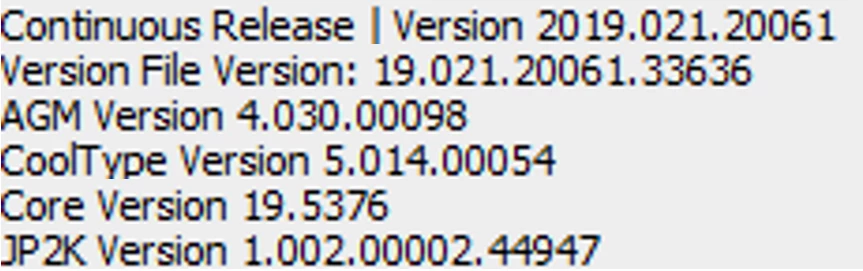
The electronic files in my possession are copies of the actual PDF files produced on a Konica Minolta bizhub C368. I am using Adobe Acrobat Pro DC with the following version information:
Your prompt attention to this matter would be greatly appreciated as the court is waiting on me before scheduling a hearing on this case.
 AdChoices