
Participant
April 28, 2025
Question

text box don't see color

  • April 28, 2025
  • 1 reply
  • 127 views

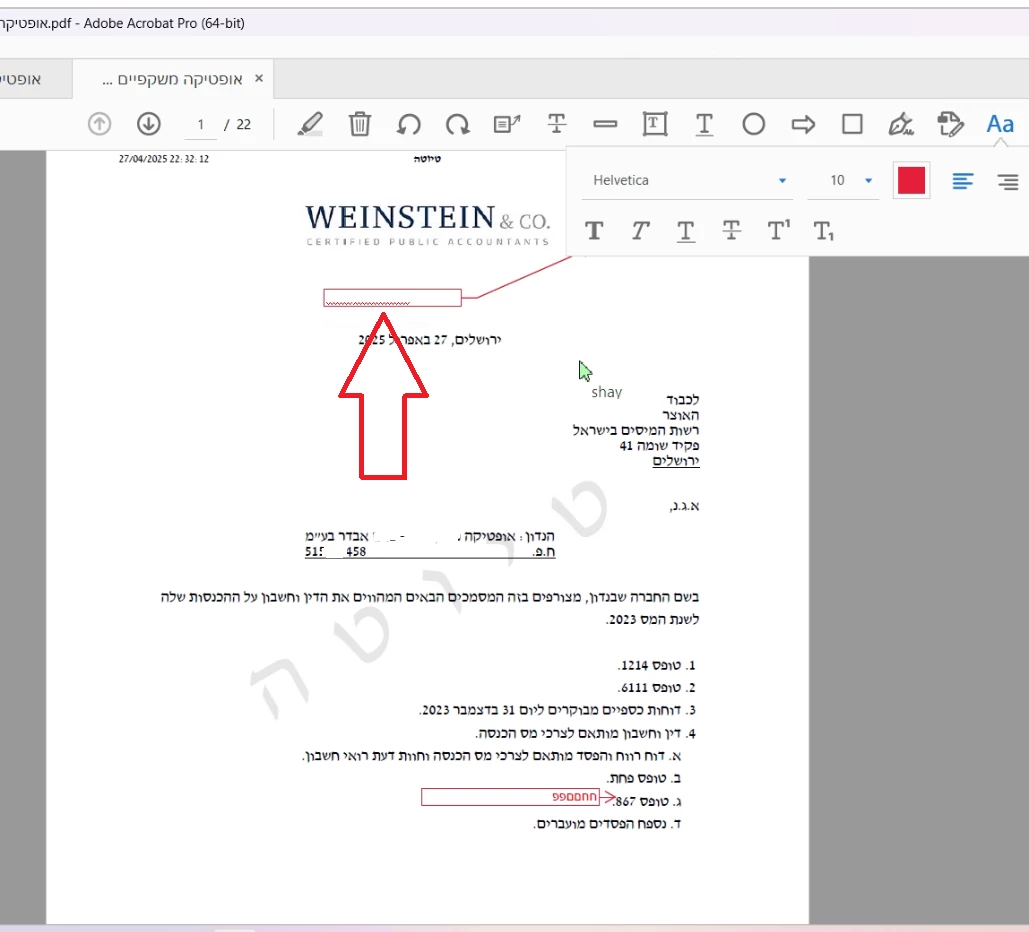
When I use the "Add Text Box" feature in a PDF, the text I type inside the box is not visible when I click on it. It seems like the text color blends with the background, making it impossible to see what I wrote until selecting the box.

I would be happy to help

shay
1 reply

Community Manager
April 28, 2025

Hi @Dov5FF2


Thank you for reaching out.

When using the Add Text tool under the Comment feature, the color you select applies to the text itself (font color), not to the background behind the text.

Try "Add Text" again and select all text typed, choose a color, and ensure the Text you have typed is all selected. Once the text is selected, close the color selector and check if the newly selected color applies to it. Also, try to work on a new single-page document, and check if that works or not. 


Also, ensure that Acrobat is updated. To check for any pending updates, launch Acrobat > Help > Check For Updates.


Let us know how it works at your end. 


~Tariq