Participant
December 3, 2017
Answered

Text Box Formatting

  • December 3, 2017
  • 1 reply
  • 6162 views

I just upgraded to Adobe Acrobat Pro 2017.  I've tried everything but I cannot figure out how to format a text box.  In the previous versions it was very easy to change the width of the box outer lines, or the color etc.  BUT, I cannot even find how to create a text box. 

Any help would be greatly appreciated.

This topic has been closed for replies.
Correct answer Document Geek

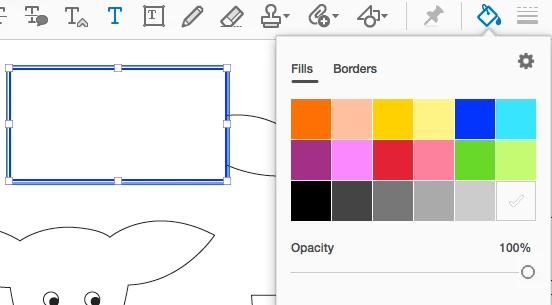
First, click on the Comments tool. Then your toolbar will populate with all your individual commenting tools. Text box formatting controls are found in under the blue A in the tool bar. If you want to change the color of the border or fill, click on the paint bucket. Click on the lines next to the paint bucket to change the thickness of the lines.

1 reply

Document Geek
Community Expert
Document GeekCommunity ExpertCorrect answer
Community Expert
December 4, 2017

First, click on the Comments tool. Then your toolbar will populate with all your individual commenting tools. Text box formatting controls are found in under the blue A in the tool bar. If you want to change the color of the border or fill, click on the paint bucket. Click on the lines next to the paint bucket to change the thickness of the lines.