I inserted a scanned PDF file and I want it in WORD in Hebrew. It creates a file in Acrobat that looks good, but when I move it to WORD, it converts the texts to LTR instead of RTL. The numbers in the LIST are fine. Maybe there is a problem with the transition to OCR? It seems to me that it is with the transition to WORD. I have already managed to convert 3 different files.
Thank you for reaching out, and sorry for the trouble caused.
There is a known limitation in the Acrobat to Word export workflow for RTL (right‑to‑left) languages, especially Hebrew. The OCR itself is generally working correctly. The directionality issue is introduced during export to Microsoft Word, where Word interprets much of the recognised text as LTR rather than RTL.
Please try the following and check if that helps:
Open PDF in Acrobat.
Go to All tools > Export PDF
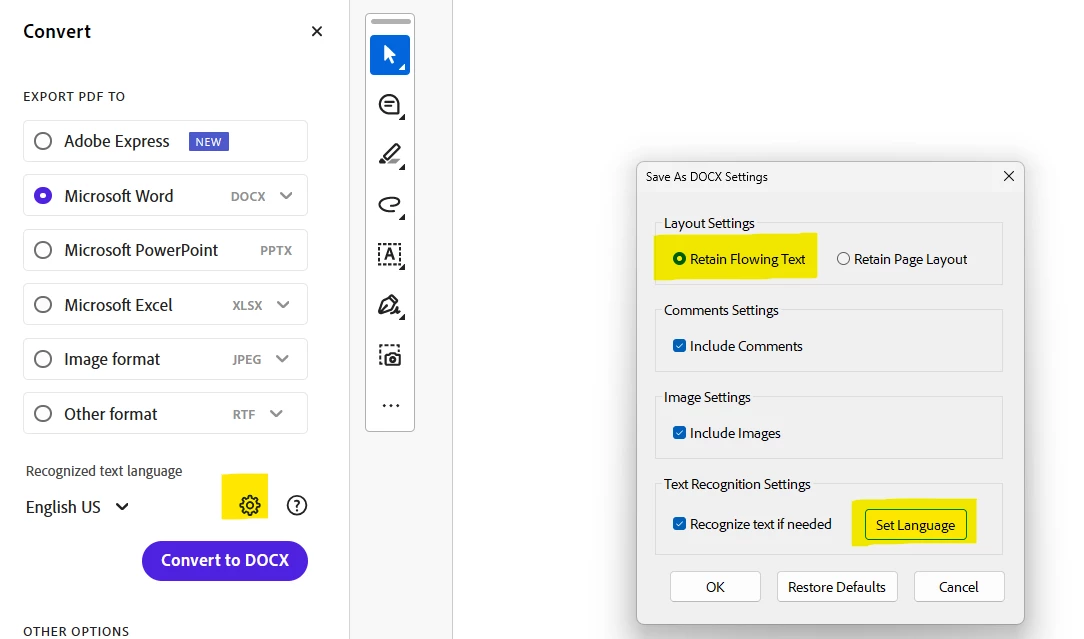
In the Convert pane at left, select Microsoft Word under Export PDF to.
Then under Recognized text language option below, click on gear icon to open the settings.
In the Save as DOCX settings window, select “Retain flowing text” under Layout settings.
Under the Text recognition settings, click on Set language and select Hebrew from the drop down for document language.
Click on the OK button at the bottom of the window to save changes.
Thank you for reaching out, and sorry for the trouble caused.
There is a known limitation in the Acrobat to Word export workflow for RTL (right‑to‑left) languages, especially Hebrew. The OCR itself is generally working correctly. The directionality issue is introduced during export to Microsoft Word, where Word interprets much of the recognised text as LTR rather than RTL.
Please try the following and check if that helps:
Open PDF in Acrobat.
Go to All tools > Export PDF
In the Convert pane at left, select Microsoft Word under Export PDF to.
Then under Recognized text language option below, click on gear icon to open the settings.
In the Save as DOCX settings window, select “Retain flowing text” under Layout settings.
Under the Text recognition settings, click on Set language and select Hebrew from the drop down for document language.
Click on the OK button at the bottom of the window to save changes.




 AdChoices