Participant
May 2, 2018
Answered

Text goes vertical as I'm typing it when use "Add Text" tool- Acrobat Pro DC

  • May 2, 2018
  • 1 reply
  • 2543 views

At random times when I'm typing text using the "Add Text" tool, the text orientation switches to vertical/portrait.  I end up having to delete it and start again, more slowly.

Any ideas why this happens and how to fix it?  I searched the help forum and Googled it, but haven't found any answers.

I'm using Acrobat Pro DC.
This topic has been closed for replies.
Correct answer Adorobat

Hi Dawnwbid,

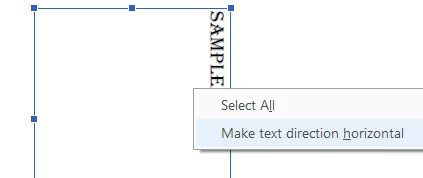
Try adding text on the pdf using Add text option> right click and choose make text direction horizontal and check if that helps. (below is the screenshot)

Let us know if you need any help.

Shivam

1 reply

Adorobat
AdorobatCorrect answer
Participating Frequently
May 10, 2018

Hi Dawnwbid,

Try adding text on the pdf using Add text option> right click and choose make text direction horizontal and check if that helps. (below is the screenshot)

Let us know if you need any help.

Shivam