
Inspiring
January 19, 2024
Answered

Text in a box

  • January 19, 2024
  • 6 replies
  • 1550 views

I have a fillable document that started as a Word (docx) document that I imported into Acrobat. The user asked me to add some text but put the text in a box. (See below)
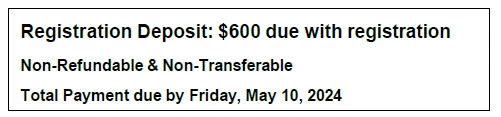
This is easy in Word, but I haven't found a way to do it in Acrobat. The closest I have come is to create a text field and mark it read only. It works, but I don't like the result not ot mention that it is different from the other boxes texts..

Is there a way to create a box around text that looks like something Word would product.

Jack


This topic is closed to new replies. Start a new post to keep the conversation going.
Correct answer JR Boulay

Use the "Add Text Box" Comment tool and then flatten the page or the document.

It's easier to do using the Flatten plugin which is part of the (free) abracadabraTools:

https://www.abracadabrapdf.net/utilitaires/utilities-in-english/abracadabratools_en/


6 replies

JR Boulay
Community Expert
JR BoulayCommunity ExpertCorrect answer
Community Expert
January 19, 2024

Use the "Add Text Box" Comment tool and then flatten the page or the document.

It's easier to do using the Flatten plugin which is part of the (free) abracadabraTools:

https://www.abracadabrapdf.net/utilitaires/utilities-in-english/abracadabratools_en/


Acrobate du PDF, InDesigner et Photoshopographe
Jack157FAuthor
Inspiring
January 19, 2024

Where do I find the "Add Comment Box"? Is it part of Edit PDF?

try67
Community Expert
Community Expert
January 19, 2024

Under the Comment section.