
Text size changing upon printing?
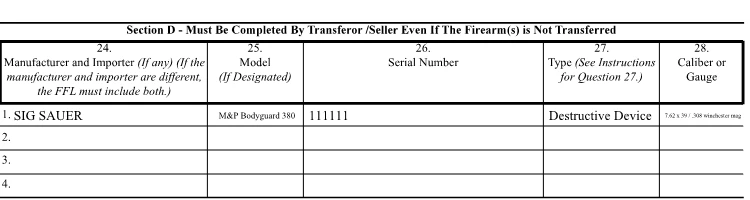
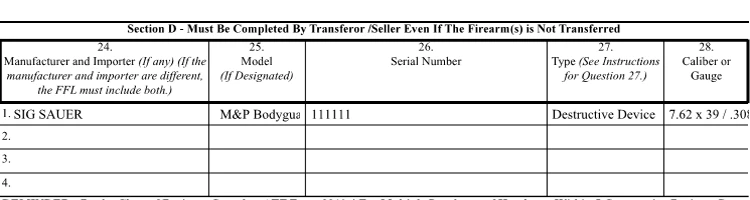
I've created a PDF in acrobat and I have a table with all fields text size set to "auto". I have created a program that auto-fills the answers onto the PDF based off of answers given in the program. Whenever I see the preview of the PDF within my program, the text is definitely auto-sized, but whenever I print the document, the text is not auto-sized and the text falls out of the textfield. Any ideas?
Here is an example of the preview within my program:
And this is the printed version:
Also, just to note, I am using the PDFSharp API in my project to generate the preview on screen, but I am convinced it is not the library that is creating the issue. The font is Times Roman, so there should not be any type of font mismatch upon printing.. It is just not auto sizing! I'm also not positive if this is the right forum to be posting on, so please if there is another one that is better suited for my problem let me know!
EDIT: Just so you are aware, when I generate the PDF I also save it to a local file path after generation, using an exact copy of the template. I just went to the local file path and looked up the PDF's. When I first opened them, they definitely were falling out of the text fields like when I print them. But when I right click and select "Edit with Acrobat", I see that their text is set to "Auto". Upon closing, it asks if I'd like to save the form, in which I do, and then when I reopen the file the text is auto-sizing correctly. This leads me to believe that this might actually be a bug in Acrobat itself, as this is not just an isolated issue. All of my clients are having the same issue.
Thank you!
 AdChoices