Participant
Oct 1, 2024 11:53 AM UTC
Answered

The compress tool does not compress my pdf file in Acrobat Pro

Hi 

I have a huge pdf of 37 MB wich I need to downscale to max. 16 MB

I have tried the drag and drop section, where it shows the highest level of compression should give me an pdf at apx. 7 MB - when it is done compressing, but  I cannot download the small file only the larger file at 23MB. The notice says the file is already compressed, so I cannot compress it. 

No matter weather I compress it high, medium or low - the file ends up at 23 MB

The same goes for the kind of pdf I upload - interactive or print file, high or low resolution.


Can anyone help. please? I cannot get in contact with Adobe for help ...

Thank you so much for taking time reading my question.

Best,

Marina

try67
try67Correct answer
Community Expert
Oct 1, 2024 12:24 PM UTC

Compression is not a magical process. Some things can't be compressed, such as fonts. If you have embedded fonts in your file that take that much space the only way to reduce the file-size would be to subset them or to switch to other fonts entirely. Also, not all images (eg. vector-based images) can be compressed.

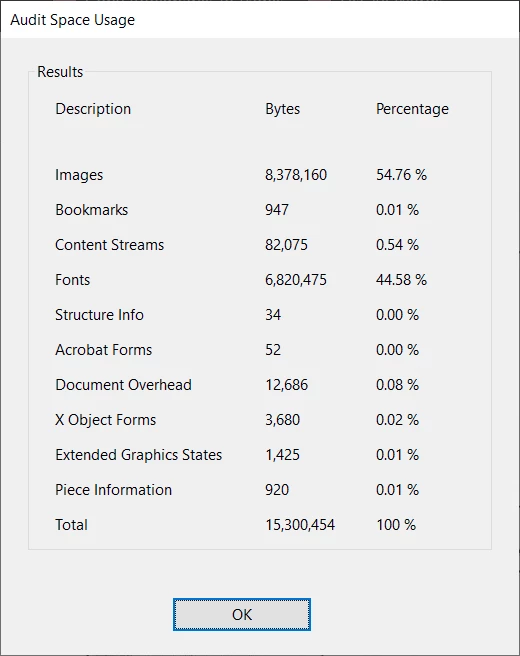
You should start by inspecting the file in order to figure out what takes most of the space in it. To do that, open the Content panel, then right-click the top-most item and select Audit Space Usage. You will get a window like this:


This should give you a good indication on how to proceed.


3 replies

Participating Frequently
Jan 22, 2025 12:04 PM UTC

I find that images compress well, but other thing do not. 


The worest offender is when you reprint an exisiting PDF file, using a print to PDF tool, you can end up with some huge files that way, and they often hardly compress at all. 

Translate
try67
Community Expert
try67Community ExpertCorrect answer
Community Expert
Oct 1, 2024 12:24 PM UTC

Compression is not a magical process. Some things can't be compressed, such as fonts. If you have embedded fonts in your file that take that much space the only way to reduce the file-size would be to subset them or to switch to other fonts entirely. Also, not all images (eg. vector-based images) can be compressed.

You should start by inspecting the file in order to figure out what takes most of the space in it. To do that, open the Content panel, then right-click the top-most item and select Audit Space Usage. You will get a window like this:


This should give you a good indication on how to proceed.


Translate
Participant
Oct 1, 2024 12:30 PM UTC

Thank you - I solved it by creating an old school PostScript file and ran it through the Distiller - that worked magic - the file is now 2 MB

Translate