
Participant
December 19, 2024
Answered

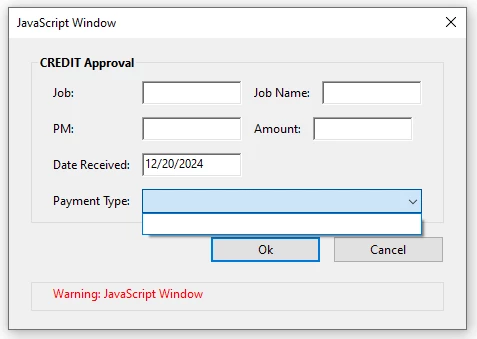
The Dropdown list does not appear on the Dynamic PDF Stamp!
  • December 19, 2024
  • 3 replies
  • 514 views


Hi, 

This is the Code I use but the Dropdown list does not appear

Can Anyone give me the corrected script? please 

var FormRouting = {
return: 'cancel',
DoDialog: function () {
return app.execDialog(this);
},
initialize: function (dialog) {
// Initialize default values
var dlgInit = {
str1: "", // Job
str2: "", // Job Name
str3: "", // PM
str4: "", // Amount
str5: util.printd("mm/dd/yyyy", new Date()), // Current Date Received
str6: "Approved" // Default dropdown value
};

dialog.load(dlgInit);
},
commit: function (dialog) {
// Retrieve user inputs from the dialog
var oRslt = dialog.store();
this.str1 = oRslt['str1']; // Job
this.str2 = oRslt['str2']; // Job Name
this.str3 = oRslt['str3']; // PM
this.str4 = oRslt['str4']; // Amount
this.str5 = oRslt['str5']; // Date Received
this.str6 = oRslt['str6']; // Payment Type dropdown selection
console.println("Selected Payment Type: " + this.str6); // Log selected value for debugging
},
description: {
titlename: "CREDIT Approval",
align_children: "align_left",
width: 400,
height: 300,
elements: [
{
type: "cluster",
name: "CREDIT Approval",
align_children: "align_fill",
font: "dialog",
bold: true,
elements: [
{
type: "view",
align_children: "align_row",
elements: [
{ type: "static_text", name: "Job:" },
{ item_id: "str1", type: "edit_text", width: 100 },
{ type: "static_text", name: "Job Name:" },
{ item_id: "str2", type: "edit_text", width: 100 }
]
},
{
type: "view",
align_children: "align_row",
elements: [
{ type: "static_text", name: "PM:" },
{ item_id: "str3", type: "edit_text", width: 100 },
{ type: "static_text", name: "Amount:" },
{ item_id: "str4", type: "edit_text", width: 100 }
]
},
{
type: "view",
align_children: "align_row",
elements: [
{ type: "static_text", name: "Date Received:" },
{ item_id: "str5", type: "edit_text", width: 100 }
]
},
{
type: "view",
align_children: "align_row",
elements: [
{ type: "static_text", name: "Payment Type:" },
{
type: "popup",
item_id: "str6",
width: 150,
alignment: "align_fill",
items: ["Approved", "Rejected", "Pending Review"] // Dropdown options
}
]
}
]
},
{
alignment: "align_right",
type: "ok_cancel",
ok_name: "Ok",
cancel_name: "Cancel"
}
]
}
};

// Event trigger to run the dialog
if (event.source.forReal && event.source.stampName === "#Credit") {
if ('ok' === FormRouting.DoDialog()) {
// Map the dialog values to the form fields in the document
this.getField("Job").value = FormRouting.str1; // Job
this.getField("JobName").value = FormRouting.str2; // Job Name
this.getField("PM").value = FormRouting.str3; // PM
this.getField("Amount").value = FormRouting.str4; // Amount
this.getField("DateReceived").value = FormRouting.str5; // Date Received
this.getField("PaymentType").value = FormRouting.str6; // Payment Type
}
}

This topic has been closed for replies.
Correct answer Thom Parker

That won't provide the dropdown selection. The value of "str6" is the object used to set the dropdown item list. 

Use this code. 


var FormRouting = {
GetListSel:function(oLst){for(var x in oLst){if(oLst[x]>0)return x;}return null;},
initialize: function (dialog) {
// Initialize default values
var dlgInit = {
str1: "", // Job
str2: "", // Job Name
str3: "", // PM
str4: "", // Amount
str5: util.printd("mm/dd/yyyy", new Date()), // Current Date Received
str6: {"Approved":1, "Rejected":-1, "Pending Review":-1}
};

dialog.load(dlgInit);
},
commit: function (dialog) {
// Retrieve user inputs from the dialog
var oRslt = dialog.store();
this.str1 = oRslt['str1']; // Job
this.str2 = oRslt['str2']; // Job Name
this.str3 = oRslt['str3']; // PM
this.str4 = oRslt['str4']; // Amount
this.str5 = oRslt['str5']; // Date Received
this.str6 = this.GetListSel(oRslt['str6']); // Payment Type dropdown selection
console.println("Selected Payment Type: " + this.str6); // Log selected value for debugging
},
description: {
titlename: "CREDIT Approval",
align_children: "align_left",
width: 400,
height: 300,
elements: [
{
type: "cluster",
name: "CREDIT Approval",
align_children: "align_fill",
font: "dialog",
bold: true,
elements: [
{
type: "view",
align_children: "align_row",
elements: [
{ type: "static_text", name: "Job:" },
{ item_id: "str1", type: "edit_text", width: 100 },
{ type: "static_text", name: "Job Name:" },
{ item_id: "str2", type: "edit_text", width: 100 }
]
},
{
type: "view",
align_children: "align_row",
elements: [
{ type: "static_text", name: "PM:" },
{ item_id: "str3", type: "edit_text", width: 100 },
{ type: "static_text", name: "Amount:" },
{ item_id: "str4", type: "edit_text", width: 100 }
]
},
{
type: "view",
align_children: "align_row",
elements: [
{ type: "static_text", name: "Date Received:" },
{ item_id: "str5", type: "edit_text", width: 100 }
]
},
{
type: "view",
align_children: "align_row",
elements: [
{ type: "static_text", name: "Payment Type:" },
{
type: "popup",
item_id: "str6",
width: 150,
alignment: "align_fill",
items: ["Approved", "Rejected", "Pending Review"] // Dropdown options
}
]
}
]
},
{
alignment: "align_right",
type: "ok_cancel",
ok_name: "Ok",
cancel_name: "Cancel"
}
]
}
};

// Event trigger to run the dialog
if (event.source.forReal && event.source.stampName === "#Credit") {
if ('ok' == app.execDialog(FormRouting)) {
// Map the dialog values to the form fields in the document
this.getField("Job").value = FormRouting.str1; // Job
this.getField("JobName").value = FormRouting.str2; // Job Name
this.getField("PM").value = FormRouting.str3; // PM
this.getField("Amount").value = FormRouting.str4; // Amount
this.getField("DateReceived").value = FormRouting.str5; // Date Received
this.getField("PaymentType").value = FormRouting.str6; // Payment Type
}
}


Just a note about coding.  Use indents to format the code to make it more readable. Proper formatting will make it easier for you to find issues such as matching brackets. Also, don't use the identity operator ("===") unless it's really needed. For the vast majority of situations the equality operator ("==") is the correct way to go. 


3 replies

PDF Automation Station
Community Expert
Community Expert
December 19, 2024

Up to before //Event trigger to run dialog, changes in blue.


var FormRouting = {
return: 'cancel',
DoDialog: function () {
return app.execDialog(this);
},
initialize: function (dialog) {
this.loadDefaults(dialog);
// Initialize default values
var dlgInit = {
str1: "", // Job
str2: "", // Job Name
str3: "", // PM
str4: "", // Amount
str5: util.printd("mm/dd/yyyy", new Date()), // Current Date Received

};
dialog.load(dlgInit);
},
commit: function (dialog) {
// Retrieve user inputs from the dialog
var oRslt = dialog.store();
this.str1 = oRslt['str1']; // Job
this.str2 = oRslt['str2']; // Job Name
this.str3 = oRslt['str3']; // PM
this.str4 = oRslt['str4']; // Amount
this.str5 = oRslt['str5']; // Date Received
this.str6 = oRslt['str6']; // Payment Type dropdown selection
console.println("Selected Payment Type: " + this.str6); // Log selected value for debugging
},
loadDefaults: function (dialog)
{
dialog.load
({str6:
{"Approved":+1, "Rejected":-1, "Pending Review":-1}
})
},
description: {
titlename: "CREDIT Approval",
align_children: "align_left",
width: 400,
height: 300,
elements: [
{
type: "cluster",
name: "CREDIT Approval",
align_children: "align_fill",
font: "dialog",
bold: true,
elements: [
{
type: "view",
align_children: "align_row",
elements: [
{ type: "static_text", name: "Job:" },
{ item_id: "str1", type: "edit_text", width: 100 },
{ type: "static_text", name: "Job Name:" },
{ item_id: "str2", type: "edit_text", width: 100 }
]
},
{
type: "view",
align_children: "align_row",
elements: [
{ type: "static_text", name: "PM:" },
{ item_id: "str3", type: "edit_text", width: 100 },
{ type: "static_text", name: "Amount:" },
{ item_id: "str4", type: "edit_text", width: 100 }
]
},
{
type: "view",
align_children: "align_row",
elements: [
{ type: "static_text", name: "Date Received:" },
{ item_id: "str5", type: "edit_text", width: 100 }
]
},
{
type: "view",
align_children: "align_row",
elements: [
{ type: "static_text", name: "Payment Type:" },
{
type: "popup",
item_id: "str6",
width: 150,
alignment: "align_fill",

/*items: ["Approved", "Rejected", "Pending Review"] // Dropdown options*/

}
]
}
]
},
{
alignment: "align_right",
type: "ok_cancel",
ok_name: "Ok",
cancel_name: "Cancel"
}
]
}
};


Thom Parker
Community Expert
Thom ParkerCommunity ExpertCorrect answer
Community Expert
December 19, 2024

That won't provide the dropdown selection. The value of "str6" is the object used to set the dropdown item list. 

Use this code. 


var FormRouting = {
GetListSel:function(oLst){for(var x in oLst){if(oLst[x]>0)return x;}return null;},
initialize: function (dialog) {
// Initialize default values
var dlgInit = {
str1: "", // Job
str2: "", // Job Name
str3: "", // PM
str4: "", // Amount
str5: util.printd("mm/dd/yyyy", new Date()), // Current Date Received
str6: {"Approved":1, "Rejected":-1, "Pending Review":-1}
};

dialog.load(dlgInit);
},
commit: function (dialog) {
// Retrieve user inputs from the dialog
var oRslt = dialog.store();
this.str1 = oRslt['str1']; // Job
this.str2 = oRslt['str2']; // Job Name
this.str3 = oRslt['str3']; // PM
this.str4 = oRslt['str4']; // Amount
this.str5 = oRslt['str5']; // Date Received
this.str6 = this.GetListSel(oRslt['str6']); // Payment Type dropdown selection
console.println("Selected Payment Type: " + this.str6); // Log selected value for debugging
},
description: {
titlename: "CREDIT Approval",
align_children: "align_left",
width: 400,
height: 300,
elements: [
{
type: "cluster",
name: "CREDIT Approval",
align_children: "align_fill",
font: "dialog",
bold: true,
elements: [
{
type: "view",
align_children: "align_row",
elements: [
{ type: "static_text", name: "Job:" },
{ item_id: "str1", type: "edit_text", width: 100 },
{ type: "static_text", name: "Job Name:" },
{ item_id: "str2", type: "edit_text", width: 100 }
]
},
{
type: "view",
align_children: "align_row",
elements: [
{ type: "static_text", name: "PM:" },
{ item_id: "str3", type: "edit_text", width: 100 },
{ type: "static_text", name: "Amount:" },
{ item_id: "str4", type: "edit_text", width: 100 }
]
},
{
type: "view",
align_children: "align_row",
elements: [
{ type: "static_text", name: "Date Received:" },
{ item_id: "str5", type: "edit_text", width: 100 }
]
},
{
type: "view",
align_children: "align_row",
elements: [
{ type: "static_text", name: "Payment Type:" },
{
type: "popup",
item_id: "str6",
width: 150,
alignment: "align_fill",
items: ["Approved", "Rejected", "Pending Review"] // Dropdown options
}
]
}
]
},
{
alignment: "align_right",
type: "ok_cancel",
ok_name: "Ok",
cancel_name: "Cancel"
}
]
}
};

// Event trigger to run the dialog
if (event.source.forReal && event.source.stampName === "#Credit") {
if ('ok' == app.execDialog(FormRouting)) {
// Map the dialog values to the form fields in the document
this.getField("Job").value = FormRouting.str1; // Job
this.getField("JobName").value = FormRouting.str2; // Job Name
this.getField("PM").value = FormRouting.str3; // PM
this.getField("Amount").value = FormRouting.str4; // Amount
this.getField("DateReceived").value = FormRouting.str5; // Date Received
this.getField("PaymentType").value = FormRouting.str6; // Payment Type
}
}


Just a note about coding.  Use indents to format the code to make it more readable. Proper formatting will make it easier for you to find issues such as matching brackets. Also, don't use the identity operator ("===") unless it's really needed. For the vast majority of situations the equality operator ("==") is the correct way to go. 


Thom Parker - Software Developer at PDFScriptingUse the Acrobat JavaScript Reference early and often
Participant
December 20, 2024


Thank you so much, It works properly