This topic has been closed for replies.

4 replies

Meenakshi_Negi
Legend
June 27, 2023

Hi Neluser,


Thank you for your patience.


There is an optional patch has been released that addresses this issue. Please try updating the application to the latest patch from Help > Check for updates in Acrobat.

For more information, refer to the following help document: https://www.adobe.com/devnet-docs/acrobatetk/tools/ReleaseNotesDC/continuous/dccontinuousjune2023qfe...


Let us know how it goes.


Thanks,

Meenakshi


Marking a reply or response “Correct” will help future users with the same issue quickly identify the correct answer.

Neluser
NeluserAuthor
Participating Frequently
June 28, 2023

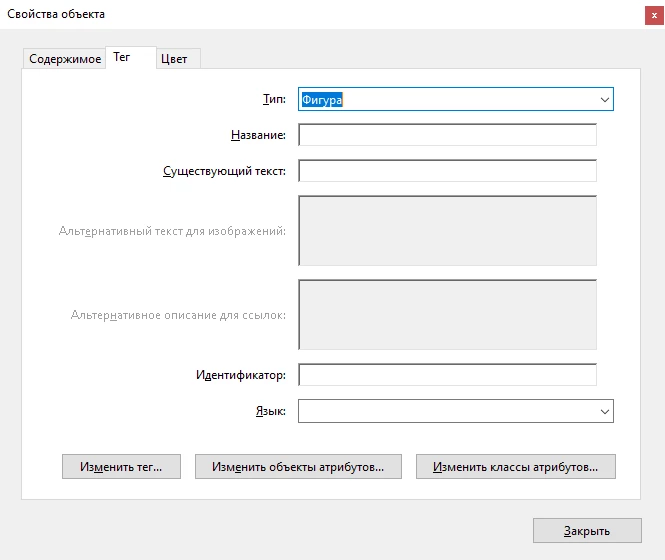
Good afternoon. I have updated the app. The error is still present.
From additional information:
Program language Installed Russian (If you change the language to English, the error disappears)
Current version of the program Adobe acrobat PRO Version 23.003.20215
Windows version Windows 10 Pro (22H2)
OS Build 19045.3086

Thanks

Adobe Employee
June 28, 2023

Thanks for reporting the issue. We are able to reproduce the issue where alt-text for images and for links are disabled with the June update. Engineering team is looking into it on priority. We will keep the thread updated with latest information.


Regards,
Rachit

Adobe Employee
June 12, 2023

Thanks for reporting the issue. We are able to reproduce the issue where alt-text for images becomes gibberish with the June update. Engineering team is looking into it on priority. We will keep the thread updated with latest information.
Regards,
Tanvi


Adobe Employee
June 9, 2023

To what tags are you attempting to apply alt text? It should only be applied to <Figure> tags and works for that purpose. When applying alt text to a tag, it will override any child tags so isn't advised for anything but a <Figure> tag.

Neluser
NeluserAuthor
Participating Frequently
June 9, 2023

Version 23.003.20201