
BarryRowell
Known Participant
June 10, 2025
Question

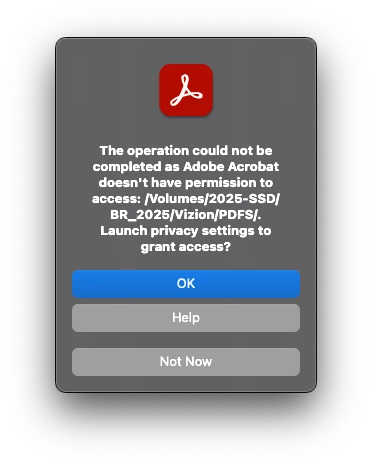
"The operation could not be completed as Adobe Acrobat doesn't have permission to access"

  • June 10, 2025
  • 1 reply
  • 2549 views

This is a lie: I have given the program the permissions it requires and almost any time I try to open a PDF when the program is already running, I get this message. If I quit Acrobat and then open the file, it will usually open it (not every time but most of the time). I am attaching screenshots of my permissions on my Mac (MacBook Pro, 2023, Apple M2 Max, 64 gb RAM running Sequoia v15.5).
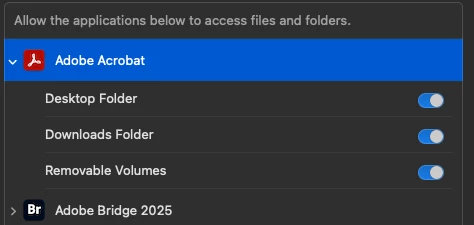
Never had this problem before and this is a new computer (to me—just bought less than a month ago).

1 reply

creative explorer
Community Expert
Community Expert
June 11, 2025

@BarryRowell try this out on your computer, as you need to change the permission via preferences... To effectively resolve this persistent permission issue, begin by navigating to your Mac's System Settings (formerly System Preferences) > Privacy & Security > Full Disk Access. Here, ensure that Adobe Acrobat is explicitly listed and its toggle switch is set to the "On" position. While you've granted access to specific folders like Desktop and Removable Volumes, "Full Disk Access" provides a broader, more robust level of system access that often bypasses the granular inconsistencies seen with interactive processes. If Acrobat is not listed, click the '+' button, find Adobe Acrobat in your Applications folder, and add it. Additionally, consider adding the specific problematic folder (/Volumes/2025-SSD/BR_2025/Vizion/PDFs/ or its parent BR_2025/Vizion/) directly to Acrobat's permissions within this same "Privacy & Security" section under Files and Folders, as this can sometimes grant more reliable access to particular locations. After making these changes, quit and relaunch Acrobat, and ideally restart your Mac, to ensure the new permissions are fully registered by the operating system.

If the problem persists, a clean reinstallation of Adobe Acrobat might be necessary to clear any corrupted application files or settings that are preventing proper permission recognition. Do youse Adobe Cleaner from Adobe themselves and not athird party website either. 

m
BarryRowell
Known Participant
June 11, 2025

Thank you—I've tried that. It's interesting that Adobe wasn't taking me to that menu: it was going directly to the menu that I showed in the screenshot, which showed that I had done what was requested. The Full Disk Access toggle was off, as it was on a couple of non-Adobe products that were causing me some consternation...  I suspect your solution is the correct one!

BarryRowell
Known Participant
June 12, 2025

Nope. Didn't work—same problem: I can open one PDF or 2 or 3 together but when I try to open another PDF after Acrobat is already open, it gives me the same message. That's the folder I posted about but I get the same message when the PDF is on the Desktop or in Downloads.