

The Read-Out-Loud functionality works differently in 'old' and 'new' Acrobat layout
I work with a 3rd party application that generates PDF files by a given template. I noticed that the produced PDF files are not read correctly in Adobe Acrobat/Reader when the ‘new’ layout is applied. When using the ‘old’ layout, the Read-Out-Loud reads the document as expected.
The app settings are unchanged.
The PDF file is tagged, and PAC (PDF Accessibility Tool) reports the structure as valid. Acrobat also shows the structure, ordered according the expected reading order:
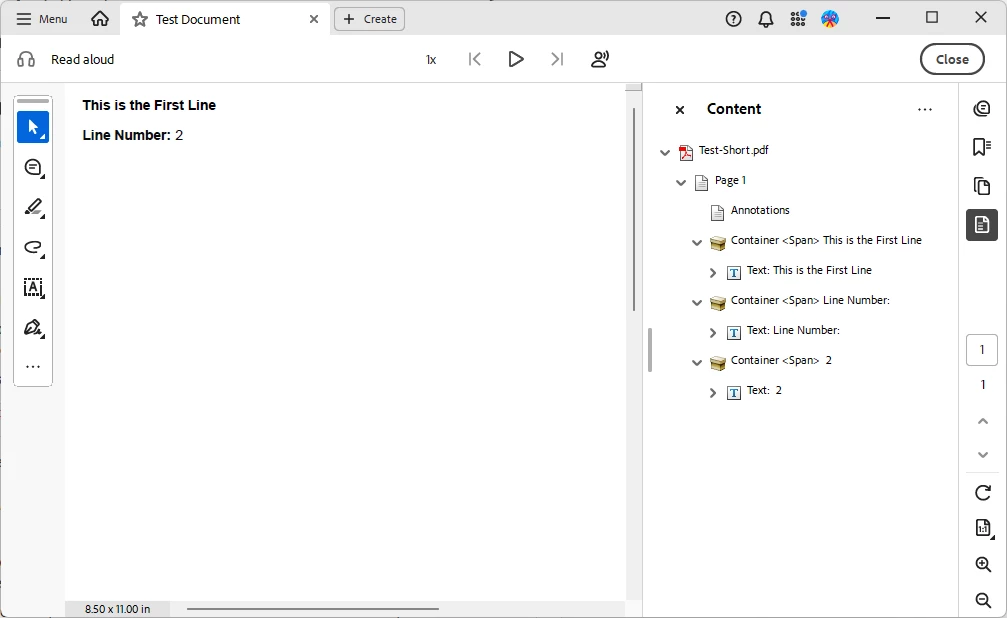
I’m attaching a very simple PDF file that demonstrates the issue. It consists of two lines:
This is the First Line
Line Number: 2
When Acrobat/Reader is using the “old” layout, the document is read as “This is the first line; Line Number 2”.
When using the “new” layout, the reading order of the second line is reversed, i.e. “This is the first line; 2; Line Number”.
I know I can re-tag the PDF, or manually edit the reading order, but since those PDFs are generated by a 3rd party app and are shipped to customers, re-tagging and editing is not an option.
Microsoft Edge, Chrome, and Foxit PDF Reader also read the document correctly.
What is wrong with the PDF so Acrobat/Reader read it incorrectly?
Thanks in advance.
 AdChoices