
Participating Frequently
May 19, 2017
Question

The value entered does not match the format of the field

  • May 19, 2017
  • 1 reply
  • 3149 views

I have created a very simple fillable pdf document for merit increases.  I have two fields that are used to calculate a percentage increase of salary.  Set up as follows:

The issue is that when there not a number in the recommended salary field, I receive the error message that "the value entered does not match the format of the field (percentage increase)". I set up the following calculation within the properties:
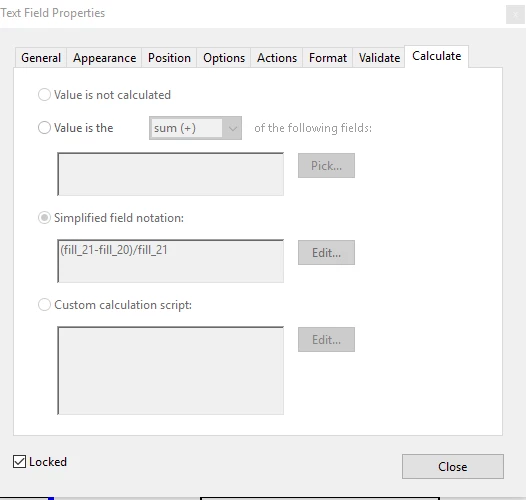
I cannot distribute the form if I am receiving any type of error (even though the work-around is to leave a number in that field at all times).  Any suggestions as to how to fix this?

Thank you!

[This was posted in the Adobe Acrobat Reader forum and was moved to PDF Forms by moderator.]

.

This topic has been closed for replies.

1 reply

try67
Community Expert
Community Expert
May 19, 2017

It happens when the divisor field is empty, at which point your calculation is trying to divide by zero, which is not a valid operation.

The solution is to use a script to perform the calculation only if that field has a non-empty, non-zero value.

Participating Frequently
May 25, 2017

Thank you for your help! I do have one more question regarding a different area of this form.  I am trying to calculate a total based on checked boxes.  As you will see below, I need to add the total based on which box is checked.  So if a box under the column labeled 5 is checked, I need to add that into the total with a value of 5.  How can this be accomplished?

try67
Community Expert
Community Expert
May 25, 2017

What are the names of the fields? Is each row a group of fields with the same name but different export values? Did you set the export values to the value of each column?