
Participant
March 29, 2021
Question

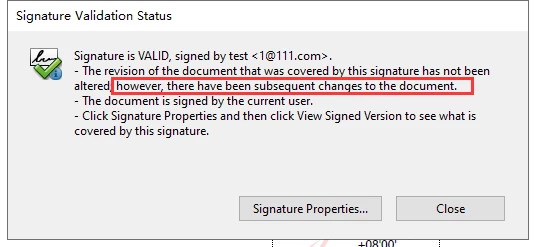
there have been subsequent changes to the document

  • March 29, 2021
  • 1 reply
  • 2702 views

I use Acrobat to sign two signature, the first signature validation status show "there have been subsequent changes to the document".

What does this sentence mean? Is the signature valid or invalid?


This topic has been closed for replies.

1 reply

MikelKlink
Participating Frequently
March 29, 2021
quote

"there have been subsequent changes to the document".

What does this sentence mean? Is the signature valid or invalid?

It means what it says. 🙂

There have been changes to your document, at least the second signature added later clearly is a change. Whether or not there are other changes, too, I cannot tell without the document in question.

Nonetheless, the changes made are in the category of allowed changes. Read this stack overflow answer for an overview of allowed and disallowed changes to signed PDFs depending on the nature of the first signature. Meanwhile additional changes are always allowed (even to documents with no changes allowed) - adding validation related information and adding document time stamps - but that stack overflow answer still gives a good overview; and Acrobat currently anyways has a known error correctly recognizing these as allowed in documents with no changes allowed.

Participant
April 1, 2021

Hi, the pdf is in the attach.

Please analyze why this document has this prompt.

MikelKlink
Participating Frequently
April 5, 2021

Comparing the revisions manually I only see:

  • new objects: 1 added signature field "Signature3" with appearance defintion, associated with page 3, already filled with a signature value
  • changed page: page 3 has a new annotation, Signature3
  • changed form definition: new field, Signature3
  • changed metadata: updated Metadata stream, updated information dictionary, updated document ID


Thus, the reported subsequent change to the document is the addition of a new signature field and the document being signed by it. This matches what you can read in the already mentioned stack overflow answer: Your first signature was no certification signature but merely an approval signature; thus, both Adding signature fields and Digitally signing are allowed.


Adobe Reader additionally reports a modification of a link annotation, see the screen shot. As there has been no actual change to any link annotation, one can only interpret this to indicate that there was a change to the target of the link: What is displayed after following the TOC link to page 3 has changed, there now is a signature field where none was before.