
Answered
There was an error during initialization. Failed to load an application resource (internal Error)
this started after the last update from adobe. it pops up several times when starting the program or opening a file. I'm running on Windows 10
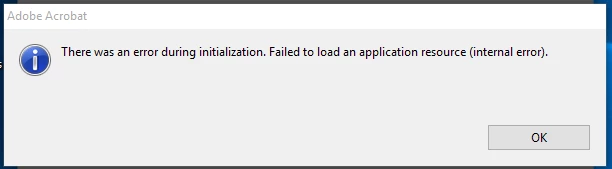

this started after the last update from adobe. it pops up several times when starting the program or opening a file. I'm running on Windows 10
I have the same issue and tried to install again with the same outcome. Any news on a solution?
Hi All,
We apologize for the delay in response. Sorry to hear that it didn't work with the trouble shooting steps suggested.
As repairing the application installation didn't help, then you may use the cleaner tool to uninstall the application
Win- Download Adobe Reader and Acrobat Cleaner Tool - Adobe Labs
Mac- Download Adobe Reader and Acrobat Cleaner Tool - Adobe Labs
and then reinstall it.
If it sill doesn't work, then try creating an hidden administrator account and check back.
Regards,
Akanchha
Already have an account? Login
No account yet? Create an account
Enter your E-mail address. We'll send you an e-mail with instructions to reset your password.


 AdChoices