


Inspiring
July 15, 2025
Question

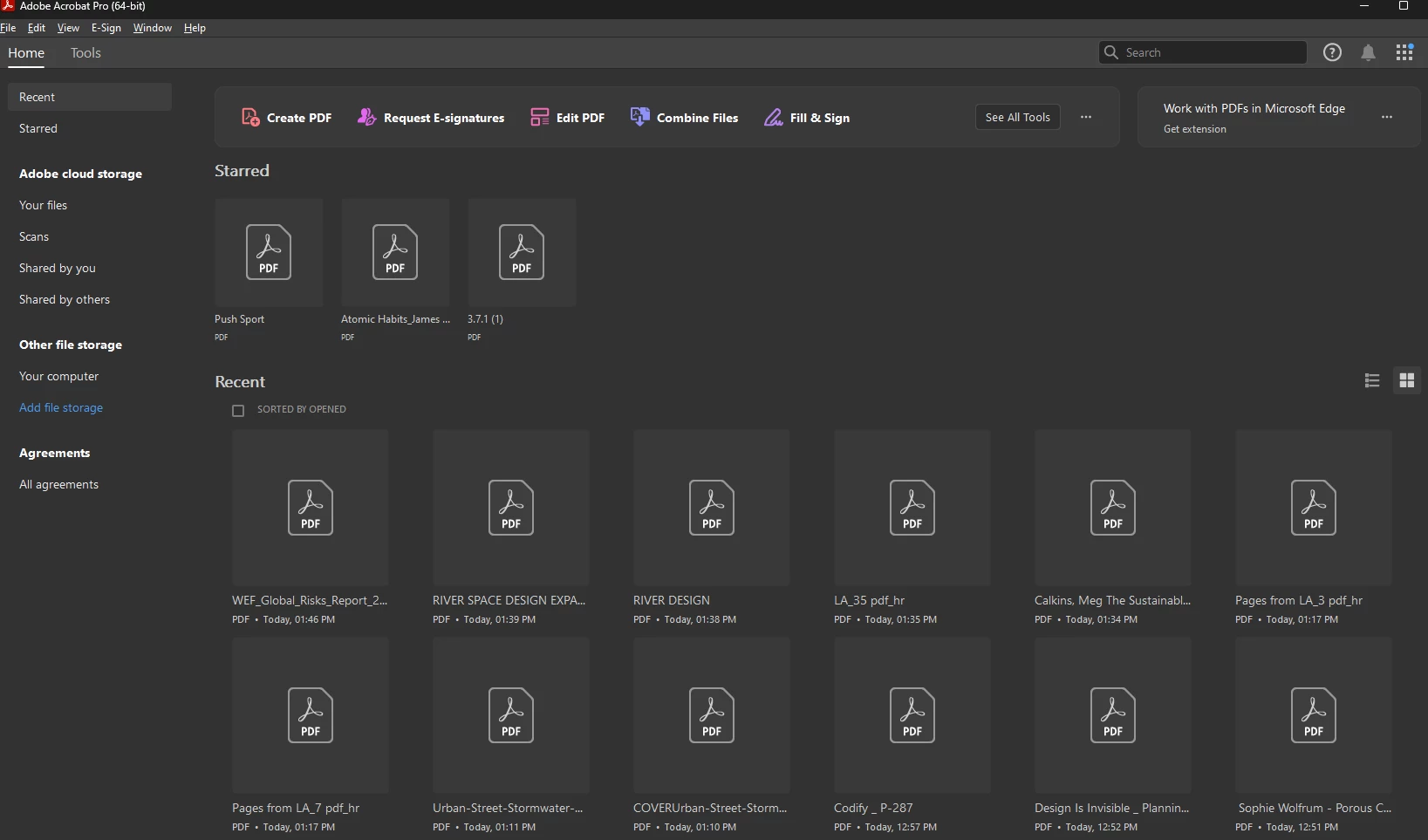
thumbnail previews not showing in recent files list

  • July 15, 2025
  • 1 reply
  • 465 views

Thumbnail previews are enabled in acrobat pro preferences. Somehow in the recents list, the thumbnail previews are not showing up. I'm using the latest version on Windows 11 - 64 bit.

What to do to fix this issue?

They used to show up earlier for a long time. I didn't install any adobe software or updated anything. The thumbnails just stopped showing suddenly. 


1 reply

Legend
July 15, 2025

Hi @Mike_Red


Thank you for reaching out, and sorry for the troubled experience. 
When did you start to observe? Has anything changed recently for you?  

In the meantime, I am checking internally with the product team. Also, please share the following details: 

  1. Acrobat version installed:  https://adobe.ly/3PQQ7nE
  2. OS name and version.
  3. Screen recording showing the problem. (optional)

Will be waiting for the details. 


Best regards,
Tariq | Adobe Community Team

Mike_RedAuthor
Inspiring
July 15, 2025

Hi Mike.


Here's the info about the installed acrobat pro version. 


My windows version info is as below. 


Mike_RedAuthor
Inspiring
July 15, 2025

Hi Tariq*


Sorry for the typo. No edit button here to correct the message after hitting the post button!!