
Time sheet per single calendar day - Adobe Acrobat X
Good evening,
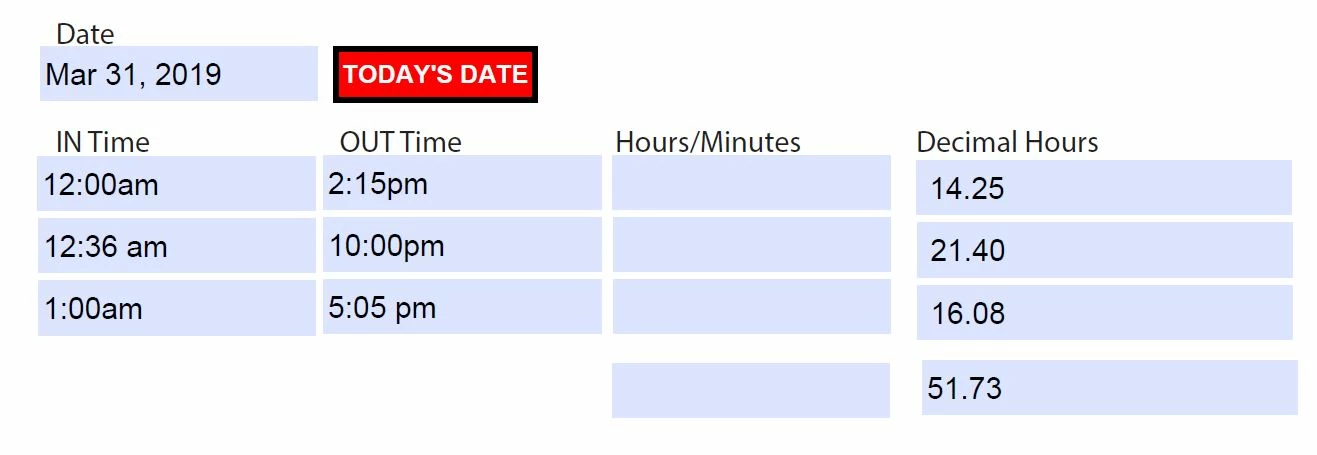
I built the attached form using gkaiseril code and it works awesome! I have only two modifications I would like to make but, unsure how to complete the task.
1. I would like to define the time format to ensure the user follows the 12-hour format using am and pm. The time sheet needs to work at 12:00am and I would like it to display 12:00am instead of 00:00. Some users might think 00:00 is the end of the world or something  . As you can see I purposely moved the am and pm over a space in a couple of fields. I would like each field to be consistent.
2. Using the script, I have the totals working in decimal hours. I would also like to show totals in hours and minutes.
This time sheet is per calendar day so the date field is not really relevant in my opinion.
Thank you in advance for your help!!!
Josh
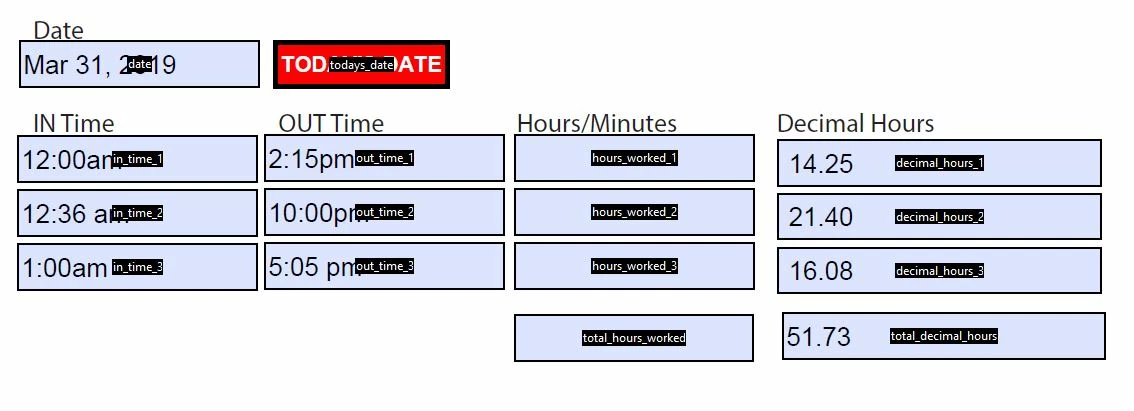
Time Sheet Image:
Script:
//-------------------------------------------------------------
//-----------------Do not edit the XML tags--------------------
//-------------------------------------------------------------
//<Document-Level>
//<ACRO_source>Round</ACRO_source>
//<ACRO_script>
/*********** belongs to: Document-Level:Round ***********/
function Round(nValue, nPrecision) {
// round a number a given precision
return util.printf("%,1 0." + nPrecision + "f", nValue);
} // end round
//</ACRO_script>
//</Document-Level>
//<Document-Level>
//<ACRO_source>Time2MinRE</ACRO_source>
//<ACRO_script>
/*********** belongs to: Document-Level:Time2MinRE ***********/
function Time2MinRE(cTime){
// convert time string h:MM tt or HH:MM to minutes
var min = 0
if ( /(\d{0,2})[:](\d{2})[ ]?([ap])/i.test(cTime) ) {
// civilian time
if(RegExp.$1 != 12)
min = 60 * RegExp.$1; // hour not 12
min += Number(RegExp.$2);
if (RegExp.$3 == "p")
min += 12 * 60; // adjust for time after 11:59.999 am
}
else if (/(\d{0,2})[:](\d{2})/.test(cTime)) {
// military time
min = 60 * Number(RegExp.$1);
min += Number(RegExp.$2);
}
return min;
} // end function Time2MinRE
//</ACRO_script>
//</Document-Level>
//<AcroForm>
//<ACRO_source>decimal_hours_1:Calculate</ACRO_source>
//<ACRO_script>
/*********** belongs to: AcroForm:decimal_hours_1:Calculate ***********/
(function () {
event.value = "";
// get time out
var sOut = this.getField('out_time_1').value;
// get time in
var sIn = this.getField('in_time_1').value;
// compute only if we have data
if(sOut != "" & sIn != "") {
// convert time out to minutes
var nOutMin = Time2MinRE(sOut);
// convert time in minutes
var nInMin = Time2MinRE(sIn);
// compute difference
var nDiff = nOutMin - nInMin;
// convert to hours
nDiff = nDiff / 60;
// round to 2 decimal places
event.value = Round(nDiff, 2);
}
return;
}) ();
//</ACRO_script>
//</AcroForm>
//<AcroForm>
//<ACRO_source>decimal_hours_2:Calculate</ACRO_source>
//<ACRO_script>
/*********** belongs to: AcroForm:decimal_hours_2:Calculate ***********/
(function () {
event.value = "";
// get time out
var sOut = this.getField('out_time_2').value;
// get time in
var sIn = this.getField('in_time_2').value;
// compute only if we have data
if(sOut != "" & sIn != "") {
// convert time out to minutes
var nOutMin = Time2MinRE(sOut);
// convert time in minutes
var nInMin = Time2MinRE(sIn);
// compute difference
var nDiff = nOutMin - nInMin;
// convert to hours
nDiff = nDiff / 60;
// round to 2 decimal places
event.value = Round(nDiff, 2);
}
return;
}) ();
//</ACRO_script>
//</AcroForm>
//<AcroForm>
//<ACRO_source>decimal_hours_3:Calculate</ACRO_source>
//<ACRO_script>
/*********** belongs to: AcroForm:decimal_hours_3:Calculate ***********/
(function () {
event.value = "";
// get time out
var sOut = this.getField('out_time_3').value;
// get time in
var sIn = this.getField('in_time_3').value;
// compute only if we have data
if(sOut != "" & sIn != "") {
// convert time out to minutes
var nOutMin = Time2MinRE(sOut);
// convert time in minutes
var nInMin = Time2MinRE(sIn);
// compute difference
var nDiff = nOutMin - nInMin;
// convert to hours
nDiff = nDiff / 60;
// round to 2 decimal places
event.value = Round(nDiff, 2);
}
return;
}) ();
//</ACRO_script>
//</AcroForm>
//<AcroForm>
//<ACRO_source>out_time_1:Format</ACRO_source>
//<ACRO_script>
/*********** belongs to: AcroForm:out_time_1:Format ***********/
// Do regular formattingcFmtData = util.printd("timeout",myTime);if(myTime.getHours() == 0){// 12 midnight, replace "00" with 12cFmtDate = cFmtDate.replace(/00\:/,"12:");}
//</ACRO_script>
//</AcroForm>
//<AcroForm>
//<ACRO_source>out_time_2:Format</ACRO_source>
//<ACRO_script>
/*********** belongs to: AcroForm:out_time_2:Format ***********/
// Do regular formattingcFmtData = util.printd("timeout",myTime);if(myTime.getHours() == 0){// 12 midnight, replace "00" with 12cFmtDate = cFmtDate.replace(/00\:/,"12:");}
//</ACRO_script>
//</AcroForm>
//<AcroForm>
//<ACRO_source>out_time_3:Format</ACRO_source>
//<ACRO_script>
/*********** belongs to: AcroForm:out_time_3:Format ***********/
// Do regular formattingcFmtData = util.printd("timeout",myTime);if(myTime.getHours() == 0){// 12 midnight, replace "00" with 12cFmtDate = cFmtDate.replace(/00\:/,"12:");}
//</ACRO_script>
//</AcroForm>
//<AcroForm>
//<ACRO_source>todays_date:Annot1:MouseUp:Action1</ACRO_source>
//<ACRO_script>
/*********** belongs to: AcroForm:todays_date:Annot1:MouseUp:Action1 ***********/
this.getField("date").value = util.printd("mmm d, yyyy",new Date());
//</ACRO_script>
//</AcroForm>
 AdChoices