
Participating Frequently
October 7, 2024
Question

Timesheets Hours Calculation

  • October 7, 2024
  • 3 replies
  • 958 views

Hi there,

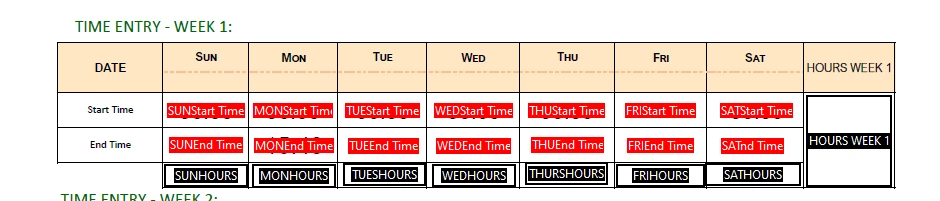
just curious if soemone can assist me with this calculation. I'm trying to get a do start time - end time or end time minus startime . which ever works to get a positive number. I thought i had it but i do not. Is this better in Custom or Simplified?

TIA
3 replies

Participant
February 11, 2025

Instead of short answers just visit this page where you will get complete guide on how to calculator working hours in excel:https://arbeitszeitrechnerprofi.de/arbeitszeit-berechnen-excel/ 

Nesa Nurani
Community Expert
Community Expert
October 8, 2024

Do you want to show total hours as HH:MM or decimal?

Participating Frequently
October 8, 2024

Decimals preferably 

Nesa Nurani
Community Expert
Community Expert
October 8, 2024

Put this as 'Custom calculation script' in "HOURS WEEK 1" field (remove any other calculation or script you have for those fields) :


function timeToMinutes(time) {
 if (!time) return 0;
 var [hours, minutes] = time.split(":").map(Number);
 return hours * 60 + minutes;}

var fields = [
 { start: "SUNStart Time", end: "SUNEnd Time", hours: "SUNHOURS" },
 { start: "MONStart Time", end: "MONEnd Time", hours: "MONHOURS" },
 { start: "TUEStart Time", end: "TUEEnd Time", hours: "TUESHOURS" },
 { start: "WEDStart Time", end: "WEDEnd Time", hours: "WEDHOURS" },
 { start: "THUStart Time", end: "THUEnd Time", hours: "THURSHOURS" },
 { start: "FRIStart Time", end: "FRIEnd Time", hours: "FRIHOURS" },
 { start: "SATStart Time", end: "SATEnd Time", hours: "SATHOURS" }
];

var totalMinutes = 0;

fields.forEach(field => {
 var startVal = this.getField(field.start).valueAsString;
 var endVal = this.getField(field.end).valueAsString;

 if (startVal && endVal) {
  var dayTotalMinutes = timeToMinutes(endVal) - timeToMinutes(startVal);
  dayTotalMinutes = Math.max(dayTotalMinutes, 0);
  totalMinutes += dayTotalMinutes;

  var dayDecimalHours = (dayTotalMinutes / 60).toFixed(1);
  this.getField(field.hours).value = dayDecimalHours;} 
 else {
  this.getField(field.hours).value = "";}});

if (totalMinutes > 0) {
 var totalDecimalHours = (totalMinutes / 60).toFixed(1);
 event.value = totalDecimalHours;} 
else {
 event.value = "";}


PDF Automation Station
Community Expert
Community Expert
October 7, 2024

What is the format of your time fields?  You can't do it with a simplified notation and it looks like your time field names have spaces in the field names, but it's hard to tell with a screenshot.

Participating Frequently
October 7, 2024
The format is in HH:MM

There is a space as well for the name of the field - can readjust it if needed

Get Outlook for iOS<>
PDF Automation Station
Community Expert
Community Expert
October 7, 2024

The space means you can't use those field names in a simplified field notation, but you need a custom script anyway.  You'll find the answers here:


https://community.adobe.com/t5/acrobat-sdk-discussions/how-to-calculate-time-difference-between-2-time-fields/m-p/8996076