Participant
September 24, 2019
Answered

Title passes after "save as"

  • September 24, 2019
  • 2 replies
  • 957 views

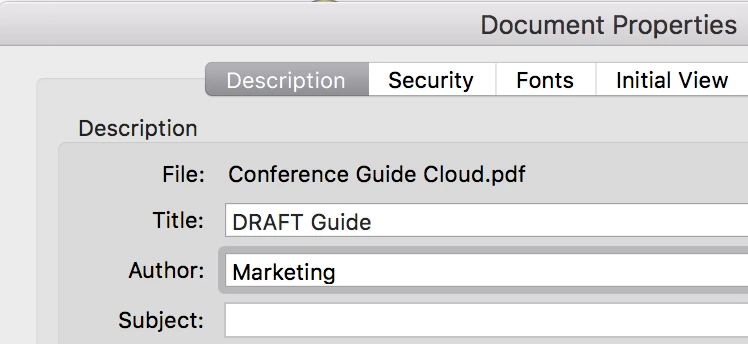
I have encountered an extremely embarassing situation. I used PDF File A as my CV for company X. I then save PDF File A as PDF File B to make further edit for company Y. I do not know why the name of PDF File A becomes the "title" of PDF File A. I further do not know why the title of PDF File A passes to that of PDF File B despite changing the file name of PDF File B. I notice this problem after sending out 2 CV. 

When I "save as" a file, I assume the file is a new one. I don't know why there is a default setting that the title of PDF File A remains the same when it is saved as PDF File B. 

I probably lost two career opportunities now.  
    This topic has been closed for replies.
    Correct answer jane-e

    Hi

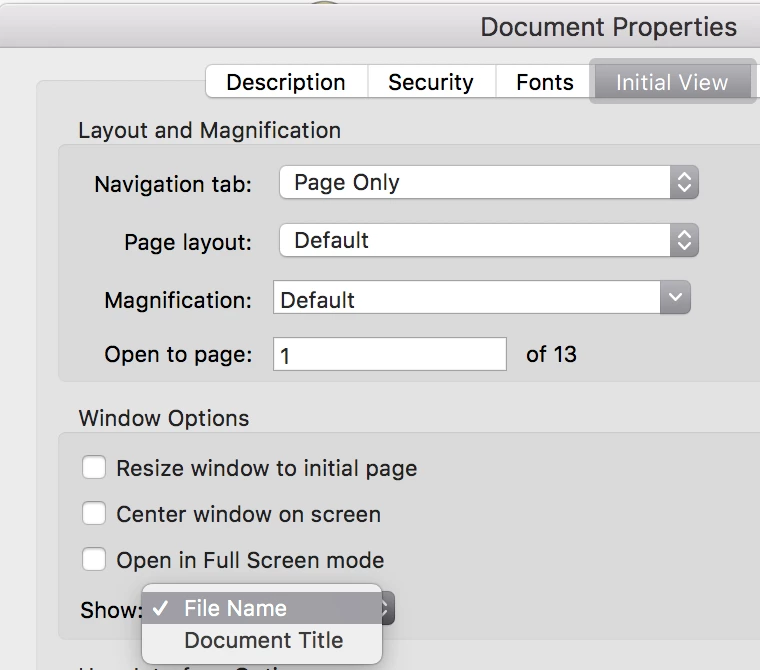
    Check File > Properties > Initial View.

    Show: File Name will show the name of the file.


    Show: Document Title will look in the Description tab and use whatever is in the Title Field.


    Is that what happened?


    ~ Jane

    2 replies

    jane-e
    Community Expert
    Community Expert
    September 24, 2019


    They can always go into properties and look at the metadata, so it’s best to always change it.


    Jane


    jane-e
    Community Expert
    jane-eCommunity ExpertCorrect answer
    Community Expert
    September 24, 2019

    Hi

    Check File > Properties > Initial View.

    Show: File Name will show the name of the file.


    Show: Document Title will look in the Description tab and use whatever is in the Title Field.


    Is that what happened?


    ~ Jane

    Participant
    September 24, 2019
    Thanks Jane. I understand what you mean. When the PDF is open separately from the browser, the name tab reflects the file name. But when it is downloaded by using Google Chrome, what is presented on the bar is the title name instead of the file name. Is that my own problem? I have uploaded a screenshot here: https://drive.google.com/open?id=1yhfJ2gZgGTq3uaA8bPgcnW7o23msIbfl
    Legend
    September 24, 2019
    It is vital to check the title is correct. You cannot control whether it gets shown. If in doubt, remove it.