
Toolbar stays customized only in first doc, uncustomized everywhere else
I'm in Acrobat Pro 2023.006.202320 on macOS (M1 chip).
What I did:
- Opened pdf 1
- Succesfully customized the toolbar the way I want
- Opened pdf 2
What I expected
The customized toolbar would appear in pdf 2 as well
What actually happened
1. A totally different, uncustomized toolbar is shown.
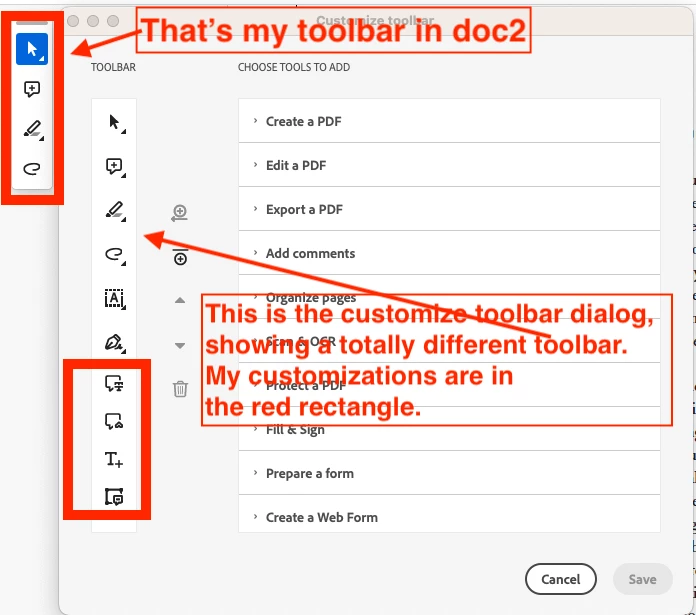
2. When I attempt to re-customize the toolbar while in pdf 2 (View > Show/Hide > Customize toolbar), bizarelly the customization dialog displays my customized toolbar. Changing and saving a customization this in the customization dialog(like moving an icon up or down, or adding another one) doesn't change the actual toolbar in pdf 2. Here's a screenshot showing the actual toolbar, and the customization dialog displaying a totally different toolbar:
3. When I re-open pdf 1 though, the customized toolbar is displayed.
Tried restarting.
At this point, all I can think of is to uninstall/reinstall.
Does anyone know how I can get out of this stuck mode? FYI I've seen posts about switching to the "old UI", but I see no such option in my View menu: I'm stuck with the new UI (which looks totally different from the UIs in online help articles like this one: https://creativecloud.adobe.com/cc/learn/acrobat/web/customize-toolbar?locale=en-CA
Any help greatly appreciated. Thanks!


 AdChoices