


Inspiring
May 5, 2021
Question

Tools Panel keep resetting to default!

  • May 5, 2021
  • 33 replies
  • 29868 views

Good day community,
Please can someone assist.

We have two work station with seperate licenses and we get this problem on both computers.

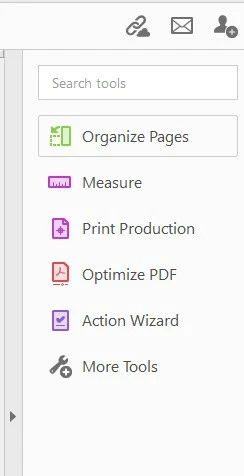
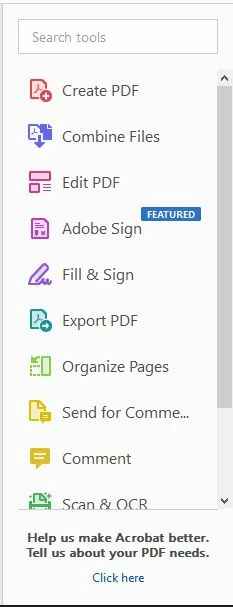
When you customize Adobe Acrobat Pro DC 32bit tool panel, the tool panel stays customised only for short while then goes back to default. I cannot wrap my head around this and it is driving me crazy having to set it up every day; some times more than once.

Cusomized:
Default:
33 replies

Participant
March 10, 2023

March 2023 and I am still having this issue as well. I've given up even trying to customize my tools panel since it defaults back within the day. This has been happening for at least two years and still it hasn't been fixed??

Known Participant
March 8, 2023

I had this problem 2-3 years ago. But the last year has been the most frequent and it also really pisses me off. The interface of the entire Adobe portfolio is so inconsistent that it's laughable, a company that makes graphic tools itself and has such a bad design of its applications - that's another discussion 🙂 As many of you write, it happens across versions, of the system, it's impossible to detect when the entire panel is reset if necessary. Sometimes it resets in a week, sometimes it lasts three months. If only the opening of the editing panel was not so insanely slow.. Oh yeah, where is the end of Acrobat 9 and 10..

Can't ADOBE at least add an option like in other apps to save your own desktop (panel presets).?

Participant
March 7, 2023

I noticed that after clicking "choose why you wanna use acrobat?" button while re-installing and choose document editing, all tools switch to documentation tools. Before that everything was just fine.

Participant
March 3, 2023

As if resetting to default wasn't annoying enough, now the toolbar keeps changing to random shortcuts.  Ones that were always available even when it reset now disappear and the order of the shortcuts keeps changing as well.  This is really getting annoyingly frustrating!

G&S Signs
Participating Frequently
March 3, 2023

HOW DO WE MAKE THIS STOP HAPPENING?!?  (It just happened again.)

Participant
February 8, 2023

My office is also having this issue.  We are working on a Windows 10 Virtual Desktop running Adobe Acrobat Pro ver 2022.003.20314.  I've had multiple employees complain about this same issue happening to them and it also happens to me.  It seems that we are having to change our tools panel on a daily basis which is extremely annoying.  Please fix this issue.

Participant
February 2, 2023

Same issue. Multiple machines, multiple versions of windows, many, many different versions of Acrobat. 

It seems the only environment this actually works in is the one they use for the test environment. Perhaps they could post the details of the test machine setup and we could all move to that...


Participant
November 30, 2022

Not the same problem, but the same struggle. Custom tools keep resetting - Screenshots show the different date.

Participating Frequently
October 3, 2022

Same issue with side panel tools resetting to apparently "defaults" (but even the defaults shown by OP would be better than the nonsense handful they usually leave me with!). It started happening a few years ago, but at first it was just every few months so I wasn't too bothered - figured it was tied to updates. But in the last few months it's increased in frequency to at least once a week, sometimes more (though I don't think it's happend 2x in 1 day as some report.)  As others have said, it seems entirely sporadic. And we have other users within our organization that it happens to occasionally, but they all seem to still be more in the "every few months" category - and it's rarely at the same time as others. So we don't think it's on our end, or we'd all be affected the same way. 

It does not seem to impact my "Quick Tools" along the top, as some others have reported. It's only the right side "Tools". 

Adobe, if you can't replicate (which is absurd b/c this isn't new) &/or stop it from happening, can you at least figure out how to add a setting or a button to lock our Tools in the order we want? Or let us save "customized workspaces" like in AI or PS? That's all we really need to solve this - can't you apply that same logic to this area of programming?

Participant
October 3, 2022

Same here too! The most annoying thing is (as i don't personalize too much) is the welcome screen / tour every time.

For me is EVERY TIME i close the app. Acrobat has becaming more slow and heavy, in the last years and now... this. Whats going on Adobe?

Participating Frequently
September 28, 2022

Same here. Same issue as everyone else has posted. Adobe, don't ask me to post computer info or logs. Doesn't look like you are using them for anything anyway except a delay tactic in fixing a big error you have in your software.

Participant
March 30, 2023

Totally agree! Newer user here and having same problem in 2023. Really, Adobe?