
Known Participant
March 29, 2023
Question

Tooltip-like display of long dropdown choices

  • March 29, 2023
  • 1 reply
  • 1033 views

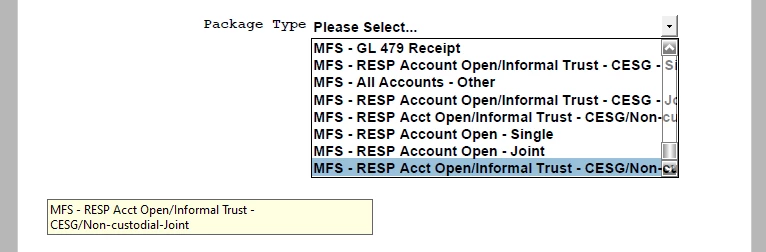
In older versions of Reader and Acrobat I see the feature as shown below.  It seems to have disappeared in the latest versions.  Is there a setting that I've missed?  This is causing me a lot of grief.  Users of my form want to know what they're clicking on.  The last and the fourth-last entries in the dropdown below look the same, and in our latest version of Acrobat there's no pseudo tooltip.


This topic has been closed for replies.

1 reply

AkanchhaS8194121
Legend
April 1, 2023

Hi @pdc@TD 


Hope you are doing well.

Checkout this form field properties once. Open For>right click on field> Properties> Appearence> Tooltip. Is it blank?

If not, just let us know the version of Acrobat you have installed. Open Acrobat>help>About Acrobat

Also, Open Acrobat>help>check for updates and install this patch 23.001.20093 


If nothing works, please share this pdf form with us. We'll check it on our end. 


Thanks,

Akanchha 

pdc@TDAuthor
Known Participant
April 1, 2023

Thanks for responding, but I'm not sure you understood what I meant.  I'm not talking about a tooltip, I'm talking about a box that appears when you hover over a long entry in a dropdown.  Look at my screen capture above.  The yellow box isn't showing a tooltip, it's showing the full text of a long dropdown choice that I was hovering over.

This functionality existed once, but apparently not in new releases.  I was using an older release for my screen capture above.

Demo attached.