


Participant
January 31, 2023
Resuelto

Troubleshooting Acrobat background processes and high CPU usage

  • January 31, 2023
  • 13 respuestas
  • 5168 visualizaciones

The issue persists already for several months. Unfortunately, did not notice when exactly started. 


So we have Acrobat Pro, version 2022.003.20314 (64-bit), Windows 11. There are three issues:


(1) After opening Acrobat (usually when you open a file, but sometimes when you just launch) in 15-20 sec the program freezes for about 10 sec. Then you can work normally and unless you open another pdf all is fine. 

(2) Almost always upon fully closing Acrobat task manager shows a process Acrobat.exe that is still running. This process takes 25-30% of CPU and remains forever unless you close it by End task. Sometimes, if you have opened and closed another instance of Acrobat without hanging the Acrobat.exe process, then a new background Acrobat.exe process appears. They all drain CPU eventually rising to 100%.

(3) Adobe plug-in in Chrome and Edge is often not working. Either need to restart the PC or shutdown Acrobat.exe process numerous times. 
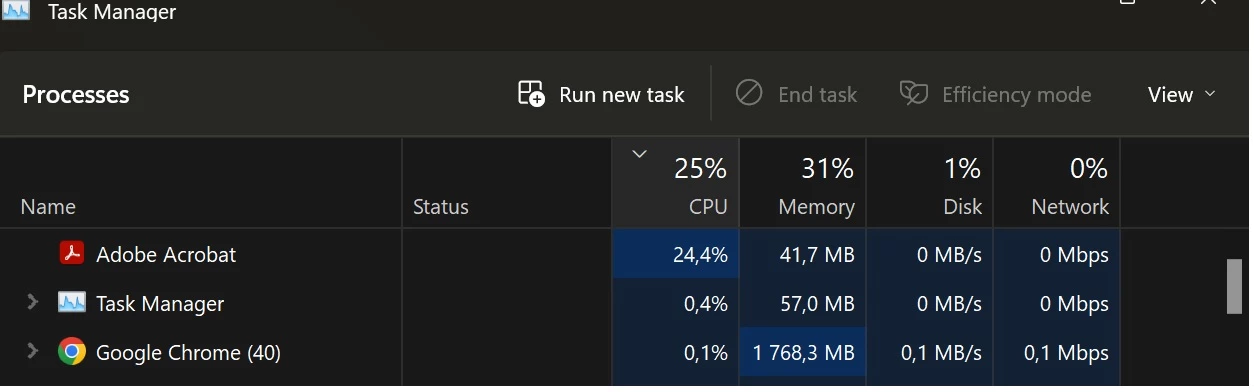


Both (1) and (2) problems seem to happen more often when opening files on the network. Opening local files usually works fine. Problem (3) is probably caused by errors from problems (1) and (2). 


Already tried the following: (a) disabling the Protected Mode at Startup, (b) reinstalling / repairing Acrobat, (c) a fresh install of Acrobat on a different PC. Nothing helped. 


Would highly appreciate any help. Please let me know if you need any logs. 

    Mejor respuesta de BaniVerma

    Hi all,


    How do I troubleshoot Acrobat continuing to run or using high CPU?

    The latest build of Acrobat/Reader version: 26.001.21745 Planned update, Jul 23, 2026, helps resolves:

    • Unable to launch Adobe Acrobat due to app running in background process
    • Multiple Adobe Acrobat processes are created in the Task Manager

    Please install the latest update from Menu > Help > Check for updates, and restart the machine after installing the build.


    If you're already on this version or later and the issue persists, continue with the additional checks below.

    References


    How can I identify whether the issue is document-specific?

    If high CPU usage occurs while working with a particular PDF, compare the behavior by opening other PDF files.

    • If the issue occurs only with one document, the behavior may be document-specific.
    • If it occurs with multiple PDFs, continue with the troubleshooting workflow.
    • If the issue occurs only with PDFs stored on a network location, test the same PDF from a local drive to help determine whether the behavior is related to the document or the storage location.

    Reference https://helpx.adobe.com/acrobat/kb/acrobat-diagnostics.html


    What should I do if the issue persists?

    If Acrobat continues to run in the background or exhibits high CPU usage after updating to a fixed version and reproducing the issue consistently, collect Adobe Acrobat Diagnostics logs while reproducing the issue and share them with Adobe Support.

    Acrobat Diagnostics captures product logs, process information, and system information that can help Adobe Support investigate Acrobat performance issues.

    References


    Thanks,

    ^BS

    13 respuestas

    BaniVerma
    Community Manager
    BaniVermaCommunity ManagerRespuesta
    Community Manager
    August 7, 2026

    Hi all,


    How do I troubleshoot Acrobat continuing to run or using high CPU?

    The latest build of Acrobat/Reader version: 26.001.21745 Planned update, Jul 23, 2026, helps resolves:

    • Unable to launch Adobe Acrobat due to app running in background process
    • Multiple Adobe Acrobat processes are created in the Task Manager

    Please install the latest update from Menu > Help > Check for updates, and restart the machine after installing the build.


    If you're already on this version or later and the issue persists, continue with the additional checks below.

    References


    How can I identify whether the issue is document-specific?

    If high CPU usage occurs while working with a particular PDF, compare the behavior by opening other PDF files.

    • If the issue occurs only with one document, the behavior may be document-specific.
    • If it occurs with multiple PDFs, continue with the troubleshooting workflow.
    • If the issue occurs only with PDFs stored on a network location, test the same PDF from a local drive to help determine whether the behavior is related to the document or the storage location.

    Reference https://helpx.adobe.com/acrobat/kb/acrobat-diagnostics.html


    What should I do if the issue persists?

    If Acrobat continues to run in the background or exhibits high CPU usage after updating to a fixed version and reproducing the issue consistently, collect Adobe Acrobat Diagnostics logs while reproducing the issue and share them with Adobe Support.

    Acrobat Diagnostics captures product logs, process information, and system information that can help Adobe Support investigate Acrobat performance issues.

    References


    Thanks,

    ^BS

    Participant
    January 14, 2025

    I have the exact same issue for Adobe Reader DC and Adobe Acrobat 2017. I restarted and called my IT, and they reomve everyting, re-installed Adobe Acrobat 2024 64 bits, the high CPU and freezing problem is still here. 

    Meenakshi_Negi
    Legend
    February 1, 2023

    Hi Marios26579148cqu1,


    Thank you for reaching out.  


    As the application freezes, try the troubleshooting steps suggested in the following help document: https://helpx.adobe.com/x-productkb/global/troubleshoot-system-errors-freezes-windows.html.

    Also, try a clean reinstall of the application. First, remove the application and run the cleaner tool (https://www.adobe.com/devnet-docs/acrobatetk/tools/Labs/cleaner.html) on the machine. 

    Reboot the machine and reinstall the application from the following page: https://helpx.adobe.com/acrobat/kb/acrobat-dc-downloads.html


    If the issue persists, share the crash logs and the process logs with us.

    For crash logs, you may use the step suggested on the following page: https://helpx.adobe.com/acrobat/kb/collect-logs-crash-freeze.html.

    Use the Process Monitor tool (https://www.adobe.com/devnet-docs/acrobatetk/tools/Labs/acromonitor.html) to get the process logs. Then share the link to the logs file with us.

    You may share the file using the steps provided under "Share an anonymous and public link to the file" on the following page: https://helpx.adobe.com/acrobat/using/sharing-pdfs.html.


    Let us know how it goes.


    Thanks,

    Meenakshi

    Participant
    February 1, 2023

    Hi Meenakshi,


    Thank you for quick reply. I ran the Process Monitor tool, but don't know which log files you need. Therefore, I packed the whole output folder. Hope that helps.


    https://drive.google.com/file/d/1zlYhGTa3SrZoxoUzj4Qzh6vP6frqKx08/view?usp=sharing 

    Participant
    February 1, 2023