Participant
February 6, 2018
Answered

trying to print labels

  • February 6, 2018
  • 3 replies
  • 14615 views

how can i change my printing option to print label instead of document

This topic has been closed for replies.
Correct answer Abambo

This is a printer driver function needs to be set in the printer properties. Acrobat prints whatever it gets to whatever printer defined as printer in your system and on any support you want, given that you can configure your printer correctly in the Printer Properties Tab.

This is for my printer:
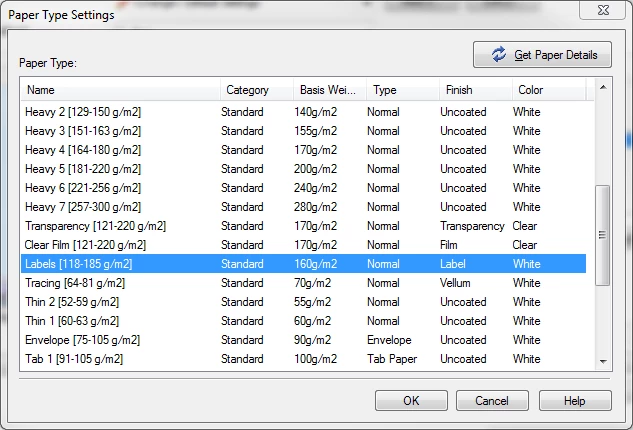
The reason to set those parameters is because the printer treats each paper quality different. Heavy paper, for example, will slow down the printing process to allow the toner to fix better the paper. With labels, the printer my lower the temperature etc.

Acrobat does not care about those settings.

3 replies

Participant
January 30, 2023

How do I print single adress on one paper?


Abambo
Community Expert
AbamboCommunity ExpertCorrect answer
Community Expert
February 14, 2018

This is a printer driver function needs to be set in the printer properties. Acrobat prints whatever it gets to whatever printer defined as printer in your system and on any support you want, given that you can configure your printer correctly in the Printer Properties Tab.

This is for my printer:

The reason to set those parameters is because the printer treats each paper quality different. Heavy paper, for example, will slow down the printing process to allow the toner to fix better the paper. With labels, the printer my lower the temperature etc.

Acrobat does not care about those settings.

ABAMBO | Hard- and Software Engineer | Photographer
Meenakshi Negi
Community Manager
Community Manager
February 13, 2018

Hi Davidp,

Sorry for the delay in response.

Could you please confirm by "changing printing option to print label", are you referring to the paper type as "Labels".

If yes, you can use this option from the printer properties.

For that, open the PDF and then click on the Print icon.

In the printer window, select the Printer from the list and then click on Properties tab.

Then go to Printing shortcuts tab and select Labels from the list.

Check if that works for you.

If you are referring to change the option from Document to Labels under the "Comments & Forms" in the Print Window, sorry to say that it is not possible.

Please let us know if you are referring to something else.

Let us know if you need any help.

Regards,

Meenakshi

Participant
January 30, 2023

How do I print single label on one paper?