

Two submit buttons
In https://helpx.adobe.com/acrobat/using/setting-action-buttons-pdf-forms.html you can read:
Add a submit button
When you distribute a form, Acrobat automatically checks the form. If it doesn’t find a submit button, it adds a Submit Form button to the document message bar. Users can click the Submit Form button to send completed forms back to you. If you don’t plan to use the Submit Form button created by Acrobat, you can add a custom submit button to your form.
I added a Submit button to my form but when I distribute the form I get two submit buttons: the one I added plus the one in the standard purple banner as shown below:
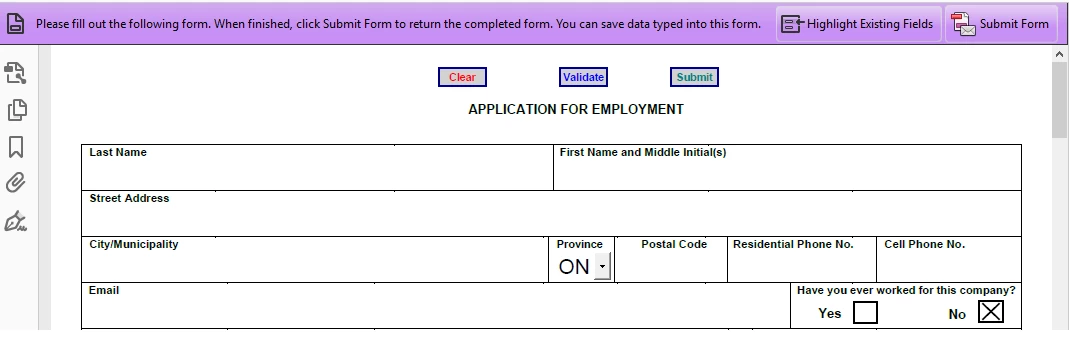
So despite my submit button, Adobe Acrobat still created its own. Any explanation?
The only reason for me to add my own submit button was to do some validation before submitting the form.
In fact, I would like to have a submit button with the following JavaScript code:
if (FormOk()==true) {
var nButton = app.alert({
cMsg: "Do you really want to submit this application form?",
cTitle: "Submit form",
nIcon: 2, nType: 2
});
if ( nButton == 4 ) {
// Submit form to UNC
this.submitForm({cURL: "\\SERVER\SHARE\", cSubmitAs:"PDF"});
app.alert({
cMsg: "Your application has been submitted",
cTitle: "Submit form",
nIcon: 3});
} else {
app.alert({
cMsg: "Your application was NOT submitted",
cTitle: "Submit form",
nIcon: 3});
}
}
This would validate the data entered (code for FormOk function not included) and if everything is Ok then would ask the user for confirmation before submitting the form.
Thanks in advance!

 AdChoices