


Participant
December 23, 2023
Question

Two Taskbar Icons When Dragging to Second Monitor

  • December 23, 2023
  • 9 replies
  • 9373 views

I have multiple monitors connected to my computer.  When I open a PDF, it opens on a montior and there is one taskbar icon.
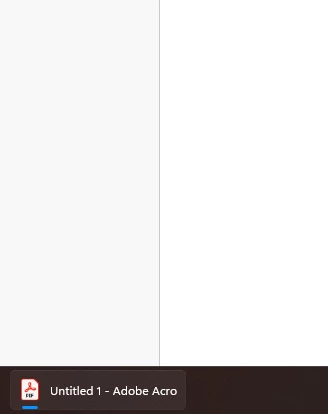


As soon as I drag the program to another monitor, I get two taskbar icons, like this...
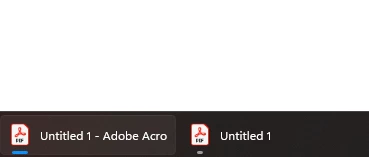


Is there a way to fix this?

9 replies

Participant
October 23, 2025

This appears to be resolved for me, version 2025.001.20756.

Participant
October 23, 2025

Spoke too soon, it's back after being gone for about a day.

Participant
October 23, 2025

I just checked and the double task bar icon issue is not happening with Adobe Acrobat 2025.001.20756 and Windows 24H2 OS Build 26100.6901, at least for now.

Participant
October 31, 2024

It's funny because the OP is from December 2023. We are about to accomplish 1 year of waiting to fix this issue.


Participant
April 17, 2025

Its time to switch another product PDF-XChange...

Participant
October 5, 2024

Same issue - October 2024 and they still haven't even responded or addressed this. It's infuriating. I open and close PDFs all day long reviewing tax returns and it drives me insane that names of files still show up in the taskbar after they're closed, and the file that is open has double icon, taking up real estate in my task bar. FIX THIS ADOBE!

Participant
October 31, 2024

Same issue here.... 😞

Viatoris
Participant
September 17, 2024

Any update on when Adobe is going to fix that?

Participant
July 28, 2024

You would think between companies like Adobe and Microsoft with an issue with their flagship products that affects so many people, they would be able to come up with a solution by now. 

Participating Frequently
July 29, 2024

"LOL" - Intuit

Participating Frequently
June 10, 2024

I have this issue on a computer that was recently upgraded from Windows 10 to Windows 11, version 23H2.

We are still using perpetually licensed Acrobat Standard 2020.  Is anyone who has reported this problem using an Acrobat DC subscription?  If we're all using perpetually licensed software, I wonder whether this issue is known and intentionally neglected.

Participant
June 10, 2024

I am not an expert in any way on this but I pay a monthly fee - around $20.00 per month - for my Adobe subscription.  Is that different from the the perpetually licensed Acrobat Standard 2020?  When I look at the Help - About it says it is Adobe Acrobat Pro Continuous Release.

Participating Frequently
June 10, 2024

TL;DR:  Yes, your subscription product is not the same as my perpetually licensed product.


A perpetual license is a one-time cost, and it allows you to use the licensed product "forever."  However, support for perpetually licensed software typically has a life span.  Support for Acrobat Standard 2020 will end on 2025-06-01.

In contrast, a subscription-based license should entitle you to the most recent version of the product and technical support for the product until you stop renewing the subscription.  As soon as you stop paying, though, the product stops working.

The inclusion of a year or a version number in the name of a product or is a good indication of perpetual licensing.

Do you have this issue with your version of Acrobat Pro?

Participant
May 20, 2024

Hi, I have the same issue... Also if you close some for the tabs in viewer they are still present on the taskbar...

Participant
July 17, 2024

I still have the same problem... any solution so far?

Participant
July 18, 2024

Still a problem for me.  I am looking for a replacement for Abobe now as they don't seem to care to fix this issue.

Participant
April 30, 2024

I also have the same annoying problem. This wasnt the problem for Windows 10 but is on Windows 11. I even uninstalled the program and reinstalled it and the problem still persist. 

The most annoying parts are 1) the "ghost" icon doesnt do anything when clicked, 2) if two files are opened and moved to different window, the two files shows up (also ghost item doesn't do anything) BUT when one of the file is closed, the ghost icon persist (even after the file is closed!). So if I had 4-5 PDFs opened and moved them from one window to another and closed some files when not needed, the files i closed is still showing up as a ghost icon. 

Participant
May 8, 2024

Totally annoying, Adobe fix this! You're getting PAID for this software.

Abambo
Community Expert
Community Expert
May 8, 2024
quote

Totally annoying, Adobe fix this! You're getting PAID for this software.


By @Radoslaw36326671fa47


Did you check this with microsoft. The taskbar settings are OS settings.

ABAMBO | Hard- and Software Engineer | Photographer
Abambo
Community Expert
Community Expert
December 24, 2023

That's an OS "issue". RMB on the taskbar:


ABAMBO | Hard- and Software Engineer | Photographer
Participant
December 25, 2023

Thank you so much for the reply and the suggestion.  Unfortunatly, changing the setting of Combine buttons on other taskbars to Never didn't help.  


The only thing I found that made a difference is to set the option "When using multiple displays, show my taskbar apps on.." to the option of All taskbars.


I really don't like to do that becuase I like to have the taskbar icon only on the taskbar where that app is open, not all of them on all displays.  Any other suggestions?

Participant
January 3, 2024

I also had this very annoying issue and 'fixed' it by using StartAllBack (which modifies the Windows taskbar).

But a genuine solution should be provided. I'm not even sure it this is an "OS issue'" since it doesn't presents itself with other tabbed software...